# Introduction

What is Gaffa?

Gaffa is a powerful API for browser automation that lets you control real web browsers at scale through a simple interface with no configuration required. We'll handle the complexities of managing infrastructure, such as virtual machines, proxies, and caching, so you can focus on building powerful, reliable web automation and AI applications!

<table data-view="cards"><thead><tr><th></th><th></th><th data-hidden data-card-target data-type="content-ref"></th></tr></thead><tbody><tr><td><strong>API Playground</strong></td><td>Start experimenting with the Gaffa API right now.</td><td><a href="https://gaffa.dev/dashboard/playground">https://gaffa.dev/dashboard/playground</a></td></tr><tr><td><strong>Get Started</strong></td><td>The simple steps to get you started using Gaffa in your apps.</td><td><a href="/pages/kzTlst3tKo255yz4YpDi">/pages/kzTlst3tKo255yz4YpDi</a></td></tr><tr><td><strong>API Reference</strong></td><td>Explore the API and docs for the finer details</td><td><a href="/pages/Jer3HvlR3KNzesxDbiIL">/pages/Jer3HvlR3KNzesxDbiIL</a></td></tr></tbody></table>

## Key features

Gaffa is ready to power your web automations:

* **Simplicity** - there's no need to learn another new framewor; Gaffa is accessible through a simple REST API - just tell it what site you want to visit and what actions you want to perform, and it will be carried out as soon as you send the request.
* **Real browsers** - headless browsers are popular but we make it simple to control real cloud-hosted browsers at scale which render JavaScript sites exactly as they would on a local machine, are harder to detect when doing scraping, and allow full observability. We're also planning to let you go beyond just controlling web browsers!
* **Proxies** - you can easily choose to route your traffic through a network of residential proxy IP addresses to help avoid bot-detection on sites you are trying to automate.
* **Scalable** - whether you want to control a single cloud browser or 100s in parallel with Gaffa, you can do that easily without one thought about infrastructure management.
* **Powerful data processing** - once you've accessed your desired site, you can export your data in a constantly growing number of formats. If you want the [page content in Markdown](/docs/features/browser-requests/actions/generate-markdown) to feed into a large language model, or [an image](/docs/features/browser-requests/actions/capture-screenshot) to feed into a vision modal we can help.

## Ready to work with Gaffa?

{% content-ref url="/pages/kzTlst3tKo255yz4YpDi" %}
[Get Started](/docs/get-started)
{% endcontent-ref %}

## Stay up to date

We'll be sporadically announcing updates and new features in our newsletter - [sign up here](https://gaffa.dev/#newsletter).


# Get Started

An introduction to the Gaffa Browser API. Learn how you can get started building fast, powerful web automations!

Welcome to the Gaffa documentation site! You'll find everything you need here to get started using the API, including [interactive API definitions](/docs/api-reference/api-authentication), [a comprehensive list of actions](/docs/features/browser-requests/actions) you can use to interact with our cloud browsers, and [breakdowns of our example requests](/docs/features/browser-requests/api-playground-examples) you can run right away in our API Playground.

{% hint style="info" %}
Gaffa is currently in its very early stages, so we'd love to hear how we can improve our docs and API to make life easier for our users. If you have any questions or comments, please [email us](emailto:support@gaffa.dev) or use [the support tool on our site](https://go.crisp.chat/chat/embed/?website_id=87a5807c-14f5-4ed3-9fbe-3d161610357b).\
\
To stay up to date with the latest developments, features, and news on the mission to support the development of revolutionary AI Agents, sign up for sporadic [newsletter](https://gaffa.dev/#newsletter) updates.
{% endhint %}

{% stepper %}
{% step %}

## Create an account

You can sign up to create a Gaffa account [here](https://accounts.gaffa.dev/sign-up?redirect_url=https%3A%2F%2Fgaffa.dev%2F%2Fauth%2Fsign-in). After signing up, you can use the API to access our [API Playground](https://gaffa.dev/dashboard/playground), which includes several prebuilt automations for [our demo site](https://demo.gaffa.dev/) that simulate a range of scenarios.&#x20;

#### Accessing the open web

When you're ready to use Gaffa on the open web, you'll need to choose a plan that suits your needs and pay for it. After that, the full internet will be available for you to automate.

{% hint style="warning" %}
To avoid scaling issues for our existing customers, we are currently using a queuing system for new accounts. Simply join the queue when prompted on your [account dashboard](https://gaffa.dev/dashboard), and we'll let you know when you have access.\
\
If you want to jump the queue, you can fill out a short survey to help us better understand our users, and we'll approve your account sooner!
{% endhint %}

{% endstep %}

{% step %}

## Making your first browser request

The easiest way to make your first Gaffa [browser request](/docs/features/browser-requests) is to use our [API Playground](https://gaffa.dev/dashboard/playground), where you can see several pre-made interactive browser request examples of automations we've built against our test site, which simulates some common scraping and web automation scenarios. You can run these examples without a paid account and edit them easily to experiment. Once you have a paid account, you can also use the playground to build your automations for other sites.

### Gaffa API Playground examples

Here are all the sample requests we've created for use in the API Playground.

<table data-view="cards"><thead><tr><th></th><th></th><th data-hidden data-card-target data-type="content-ref"></th></tr></thead><tbody><tr><td><strong>Print to PDF</strong></td><td>Export a web page to PDF and wait for elements to load with the Gaffa API.</td><td><a href="/pages/4EWaTYxnDzf6yEiWI6Nl">/pages/4EWaTYxnDzf6yEiWI6Nl</a></td></tr><tr><td><strong>Convert to Markdown</strong></td><td>Export a web page to markdown format - useful feeding into LLM apps.</td><td><a href="/pages/o8MCLugRiEWB2YhQ2kdJ">/pages/o8MCLugRiEWB2YhQ2kdJ</a></td></tr><tr><td><strong>Infinitely Scroll</strong></td><td>Scroll the bottom of a page that infinitely loads items and record the interaction.</td><td><a href="/pages/56gDIjx6cVSJcra6JXCq">/pages/56gDIjx6cVSJcra6JXCq</a></td></tr><tr><td><strong>Capture Screenshot</strong></td><td>Interact with a page and capture the a screenshot of the whole page.</td><td><a href="/pages/9kjK4DKXNkyUfUmKzFdO">/pages/9kjK4DKXNkyUfUmKzFdO</a></td></tr><tr><td><strong>Form Completion</strong></td><td>Fill out a form in a human-like way and record the interaction</td><td><a href="/pages/29tKwniN6de4eoyj7gQO">/pages/29tKwniN6de4eoyj7gQO</a></td></tr></tbody></table>

{% endstep %}

{% step %}

## Building your own browser requests

Once you have a paid account and are ready to start building your own browser requests, you'll want to read about all the other [actions ](/docs/features/browser-requests/actions)you can use for your solution, as well as how you can easily use [proxy servers](/docs/features/browser-requests#proxy-servers), [our cache](/docs/features/browser-requests#caching), and the [other endpoints that are part of the API](/docs/api-reference/api-authentication)
{% endstep %}
{% endstepper %}

## <sup>**Want to build faster with AI assistance?**</sup>

You can use Gaffa's [`llms.txt`](https://gaffa.dev/docs/llms-full.txt) file to give AI assistants like ChatGPT or Claude instant, accurate context about the Gaffa API, so they can generate working code for you straight away, without you having to explain the API yourself. [Learn how to use the Gaffa LLMs.txt file →](broken://pages/TM6N5OaBEOPp2EA1LBbI)


# Credits and Pricing

{% hint style="info" %}
View our current pricing plans on the Gaffa [homepage](https://gaffa.dev/#pricing)
{% endhint %}

## Browser Requests

Browser requests are charged in terms of credits based on the following factors:

* **Request length:** Billed at 1 credit per 30 seconds, the request takes to run on the browser.&#x20;
  * If screen recording is enabled, this is doubled to 2 credits per 30 seconds.
* **Proxy bandwidth usage:** All requests that use a `proxy_location` parameter use our network of residential proxies and are billed at 1500 credits per 1GB of bandwidth used.
* **Paid Actions:** Some actions will incur additional costs for their usage in a browser request. These are:
  * [JSON Parsing](/docs/features/browser-requests/actions/parse-json)

Each successful request will deduct the corresponding number of credits from your monthly allowance. Be sure to use as many of your monthly credits as you want, as they don't roll over month to month.

## Mapping Requests

Mapping requests are also charged in credits at a rate of **1 credit per mapping request.**


# Browser Requests

Making web automation requests has never been so simple.

Browser Requests allow you to send the Gaffa API a URL and a list of actions you want to be carried out, including any outputs you want from the page. We'll carry out the request in our cloud browsers and return the response, so you don't have to worry about proxies, IP rotation, web automation frameworks, or scaling.

There's absolutely zero configuration needed, and you can interact with Gaffa from any program that can send web requests. We think it's by far the simplest way to automate basic web tasks, and the good news is that we're just getting started and have much more planned.

### How It Works

A browser request consists of three main components:

1. **Parameters** — Control the basics like URL, proxy location, and caching
2. **Settings** — Configure recording, media limits, and timing
3. **Actions** — Define the tasks you want performed on the page

### Example Request

Running a new browser request is as simple as sending the following [POST body to our endpoint](/docs/api-reference/post-v1-browser-requests). Below, you can see the URL ([our demo site](https://demo.gaffa.dev/)) and a list of actions that instruct Gaffa to wait for the table to load, then print the page to PDF.

You can read more about this particular example and how you can run it right now in our API Playground [here](/docs/features/browser-requests/api-playground-examples/export-web-page-to-pdf).

```json
{
  "url": "https://demo.gaffa.dev/simulate/table?loadTime=3&rowCount=20",
  "proxy_location": null,
  "async": false,
  "max_cache_age": 0,
  "settings": {
    "record_request": false,
    "max_media_bandwidth": null,
    "actions": [
      {
        "type": "wait",
        "selector": "table"
      },
      {
        "type": "print",
        "size": "A4",
        "margin": 20,
        "orientation": "portrait"
      }
    ]
  }
}
```

### Stealth

We believe your AI Agents should be able to use the internet exactly how humans would. Gaffa can help you access sites with some of the most challenging anti-bot restrictions by combining proxies, human-like behaviour, captcha solving, and a custom browser implementation. We handle and maintain all of that so you can focus on building your solution!

### Learn More

[**Parameters**](/docs/features/browser-requests/parameters) — Learn about URL, proxy settings, async mode, and caching

[**Settings**](/docs/features/browser-requests/settings) — Explore recording, media bandwidth controls, and time limits

[**Actions**](/docs/features/browser-requests/actions) — Discover all available actions like screenshots, markdown generation, and more

[**Examples**](/docs/features/browser-requests/api-playground-examples) — View pre-built requests and start using them in the API Playground

[**API Reference** ](/docs/api-reference/api-authentication)— Complete endpoint documentation and technical details

### Examples

We've created a number of sample browser requests you can read about [here](https://claude.ai/chat/1ed94689-6df3-4a05-b941-a11a69af770d#), or you can jump straight into the [API Playground](https://gaffa.dev/dashboard/playground) to run them right now.

### API Endpoints

Check out our API reference for more details on the available endpoints, particularly [those you can use to query for past requests by ID or status](/docs/api-reference/get-v1-browser-requests).


# Parameters

Parameters are the top-level settings that control the fundamental behaviour of your automation. These parameters define where your request goes, how it's routed, whether it runs synchronously or asynchronously, and how caching is handled.

Below you'll find detailed documentation for each available parameter.

## Proxy servers

{% hint style="info" %}
In order to access public sites and use proxy servers, you'll need to sign up for a [paid account](https://gaffa.dev/#pricing), but after that, you'll be able to build automations for any site you wish. &#x20;
{% endhint %}

Gaffa makes it super simple to proxy your traffic through a global network of residential proxies. Setting `proxy_location` in your request will allow you to utilize one of our partner third-party proxy services to gain local access to a site.&#x20;

Not setting a `proxy_location` will mean the request does not use a proxy server and will use a generic datacenter IP.

### Available Locations

| Proxy Server Location | Country Code |
| --------------------- | ------------ |
| United States         | `us`         |
| Ireland               | `ie`         |
| Singapore             | `sg`         |
| France                | `fr`         |

{% hint style="info" %}
At the moment, all our servers are in one location, but we aim to deploy local machines at our proxy locations to improve realistic end-user load times. If this interests you, please contact support.
{% endhint %}

### IP Types

Currently, all our IP addresses are residential IP addresses, which are procured through reputable third parties.

### IP Rotation

IP rotation is an essential part of any web data scraping or automation task. In Gaffa, each browser request is treated as unique. We regularly rotate the IP addresses used, so you should assume each request is made from a different IP address than the last.

{% hint style="info" %}
We are working to support a wider range of IP address scenarios, including static IPs in the future, and to enable more trusted proxies for requests that require enhanced security (logins, etc.).
{% endhint %}

### Restrictions

Whilst we'll do our best to provide access to as wide a range of sites as possible, we may have to restrict access to certain sites to prevent abuse of our service or of other services. Our proxy partners may also enforce restrictions on certain sites and categories of sites that we don't have any control over.&#x20;

***

## Caching

`max_cache_age`: integer

When we were building Gaffa, we noticed that many existing scraping tools don't let users easily share their scraped web data, even though many users request the same pages on the same sites. Not only is this a waste of a user's allowance, but it also puts a burden on the site owners who are serving the same data to different users for the same purpose. Because of this, we have created a service-wide cache in Gaffa.

### How it works

When making a browser request, you can provide a `max_cache_age` parameter that is **a number in seconds equal to or greater than 0**. This value denotes the maximum age of data you would accept from the API.\
\
If another user of our service has requested the same URL with exactly the same parameters and actions as you in this timeframe, the response will be returned to you immediately and will not be processed by one of our browsers. If there are multiple identical requests in the given timeframe, then the most recent will be returned.\
\
This will save you time waiting for a response and credits, because requests returned from the cache don't use any bandwidth.

***

## **Settings**

The `settings` object allows you to configure how your browser requests behave. It currently supports three parameters that control recording, media downloads, and execution time limits.

You can read more about all available settings parameters [here](/docs/features/browser-requests/settings).


# Settings

The `settings` object in your browser request allows you to configure various aspects of how your automation behaves. Below are all the available settings parameters you can use.

***

## Screen Recording

**Parameter:** `record_request` (boolean)

By specifying `record_request`, you can ask Gaffa to screen record your automation and return a video in the response, allowing you to view the magic happening or to debug your automation.

Recording requests comes at an [additional cost](/docs/credits-and-pricing).

**Example:**

```json
{
  "url": "https://example.com",
  "settings": {
    "record_request": true,
    "actions": [...]
  }
}
```

***

## Max Media Bandwidth

**Parameter:** `max_media_bandwidth` (integer or null)

If you're using Gaffa on a site with lots of images and videos but are more interested in the text data on the page, you can cap how much media content a page loads using the `max_media_bandwidth` setting. This makes your automation faster and prevents spending credits on data you aren't interested in.

### Setting Options

You can set `max_media_bandwidth` in three ways:

* `"max_media_bandwidth": 0` — Block all images and videos completely
* `"max_media_bandwidth": 5` — Cap media downloads at 5MB (or any number you specify)
* `"max_media_bandwidth": null` — No limit (default)

### How It Works

When the `max_media_bandwidth` value is set, Gaffa monitors the data being downloaded by the page. When the downloaded media exceeds the specified MB limit, any further downloads of images or videos will be cancelled.

{% hint style="info" %}
**Important:** When enabled, only image and video downloads are blocked. HTML, CSS, JavaScript, and other essential page resources load normally, preserving functionality.
{% endhint %}

### Common Use Cases

This setting is particularly useful for:

* **Scraping news articles for text only** — Extract headlines and article content without downloading thumbnails
* **E-commerce price monitoring** — Track product prices and descriptions without loading product images
* **Extracting reviews and text content** — Capture customer reviews without profile pictures
* **SEO and content analysis** — Analyze page structure, headings, and text without media files

{% hint style="success" %}
**Performance Benefits:** Testing on image-heavy news sites showed up to **43% token savings** with no loss of text data. Sites with more media content see even greater savings in both cost and request speed.&#x20;
{% endhint %}

{% hint style="warning" %}
**When NOT to Use: Not recommended for capturing screenshots, verifying images, or analysing visual content.**
{% endhint %}

### Getting Started

Start with `max_media_bandwidth: 0` for maximum savings, then adjust upward only if you encounter issues with specific sites. Setting a value of `0` will cause no images to load, which works well on most sites, but on some could lead to the site thinking you are using an ad blocker.

**Example:**

```json
{
  "url": "https://www.bbc.com/",
  "settings": {
    "max_media_bandwidth": 0,
    "actions": [
      {
        "type": "generate_markdown"
      }
    ]
  }
}
```

**Learn more:** See our detailed [guide](https://gaffa.dev/blog/how-to-slash-your-gaffa-credit-costs-by-40-percent) on optimising browser requests with max\_media\_bandwidth, including real-world testing, use cases, and best practices.

***

## Time Limit

**Parameter:** `time_limit` (integer)

Using the `time_limit` setting caps the maximum running time of the request in milliseconds. If this time expires, all incomplete actions will be cancelled, and the request will return an error.

This cap must be less than the maximum request running time specified in your plan; if not set, it defaults to this value.

**Example:**

```json
{
  "url": "https://example.com",
  "settings": {
    "time_limit": 30000,
    "actions": [...]
  }
}
```

***

## Actions

**Parameter:** `actions` (array)

The `actions` parameter defines the specific tasks you want Gaffa to perform on the page once it loads. Actions are executed in the order they appear in your array and can include tasks such as waiting for elements, capturing screenshots, generating Markdown, printing to PDF, and more.

We currently support ten different types of actions, each designed for specific automation needs. [Learn more about all available actions here](/docs/features/browser-requests/actions).

**Example:**

```json
{
  "url": "https://example.com",
  "settings": {
    "actions": [
      {
        "type": "wait",
        "selector": "table"
      },
      {
        "type": "print",
        "size": "A4",
        "margin": 20,
        "orientation": "portrait"
      }
    ]
  }
}
```

***

## Complete Example

Here's a browser request using multiple settings parameters:

```json
{
  "url": "https://www.bbc.com/",
  "proxy_location": "us",
  "async": false,
  "max_cache_age": 0,
  "settings": {
    "record_request": false,
    "max_media_bandwidth": 0,
    "time_limit": 60000,
    "actions": [
      {
        "type": "wait",
        "selector": "table"
      },
      {
        "type": "print",
        "size": "A4",
        "margin": 20,
        "orientation": "portrait"
      }
    ]
  }
}
```


# Actions

When [making a Browser Request](/docs/api-reference/post-v1-browser-requests), you can specify a list of actions you want us to perform on the requested web page. These actions conform to the following format:

{% code overflow="wrap" fullWidth="false" %}

```json
{
    "type": "", //the type of the action
    //other params follow as key value pairs
    "key": value //string, number, etc. 
}
```

{% endcode %}

### Universal Parameters

All actions have the following parameters:

<table data-full-width="false"><thead><tr><th width="226">Name</th><th width="130">Type</th><th width="108" data-type="checkbox">Required</th><th>Description</th></tr></thead><tbody><tr><td><code>type</code></td><td><code>string</code></td><td>true</td><td>The type name of the action.</td></tr><tr><td><code>continue_on_fail</code></td><td><code>boolean</code></td><td>false</td><td>Should execution of further actions continue or throw an error if this action fails. <br><strong>Default:</strong> <code>false</code></td></tr><tr><td><code>customId</code></td><td><code>string</code></td><td>false</td><td>A customId to help you find the action in the response.<br><strong>Default:</strong> <code>null</code></td></tr></tbody></table>

#### Action Execution

Actions are carried out in the order they are submitted. Every action type has a `continue_on_fail` parameter, which defaults to `false`.This means that if any action fails, the execution of the browser request ends, and an error will be returned. Setting `continue_on_fail`  to `true` ensures that all actions are carried out, regardless of the previous action's results, and an error will not be returned.

#### Custom Id

As shown above, you can submit a customId with each action you submit to the API. We'll include this Id in the outputs from the browser request so you can find a certain action's output and/or status easily in the response.

## Response Format

When a browser request has completed, information on an action's execution

{% code fullWidth="false" %}

```json
{
    "id": "", //a unique id given to the action by Gaffa
    "type": "capture_screenshot", //the type of the action
    "query": "", //a representation of the action in querystring format
    "timestamp": "", //the UTC timestamp the action was executed
    "output": "" //if the action has an output, you will find a URL for this here,
    "error": "" //if the request fails, the error message will be returned here
}
```

{% endcode %}

## Supported Actions

The Gaffa API supports the following actions, detailed below. Click the "read more" buttons to read more information about each type.

### Actions without outputs

<table data-view="cards" data-full-width="true"><thead><tr><th>Type</th><th>Description</th><th>Read More</th></tr></thead><tbody><tr><td><code>click</code></td><td>Click on a given element</td><td><a href="/pages/1Cx0fCd84ZhpvRD9FVxt">Click</a></td></tr><tr><td><code>scroll</code></td><td>Scroll to a particular point on the page or,  in the case of pages with infinite scrolling, scroll until a given time has elapsed.</td><td><a href="/pages/6wXXyX2KmvSFDvKqwGOQ">Scroll</a></td></tr><tr><td><code>type</code></td><td>Type the provided text into a given element</td><td><a href="/pages/TjjKKIilt0eFTzDDyZdD">Type</a></td></tr><tr><td><code>wait</code></td><td>Wait for a given time to elapse or an element to appear on page before proceeding to the next action.</td><td><a href="/pages/Py3syTPEzIuvQYXyaDso">Wait</a></td></tr></tbody></table>

### Actions with outputs

<table data-view="cards" data-full-width="true"><thead><tr><th>Type</th><th>Description</th><th>Read More</th></tr></thead><tbody><tr><td><code>capture_cookies</code></td><td>Save a JSON object of cookies for the current page</td><td><a href="/pages/57xYZjBp4H8Q5s70KYyS">Capture Cookies</a></td></tr><tr><td><code>capture_dom</code></td><td>Export the raw DOM page data</td><td><a href="/pages/YUw0iApEEUaXhEyc4rDa">DOM</a></td></tr><tr><td><code>capture_screenshot</code></td><td>Capture a screenshot of the web page</td><td><a href="/pages/vuNr1wFsHSlW2rBFRoTL">Screenshot</a></td></tr><tr><td><code>capture_snapshot</code></td><td>Create a completely static version of the web page which can be accessed offline</td><td><a href="/pages/nYqPWzeswbuJhkSLv62g">Snapshot</a></td></tr><tr><td><code>download_file</code></td><td>Download an online file using Gaffa</td><td><a href="/pages/FvBSaG7VbCnEutHxcCj2">Download File</a></td></tr><tr><td><code>generate_markdown</code></td><td>Convert the page into markdown</td><td><a href="/pages/QtDLsZyUE94zYAaCimWo">Markdown</a></td></tr><tr><td><code>generate_simplified_dom</code></td><td>Generate a simplified version of the DOM</td><td><a href="/pages/CQm7On3E20UdLOGGAKBg">Simplified DOM</a></td></tr><tr><td><code>parse_json</code></td><td>Parse online data to a defined JSON schema</td><td><a href="/pages/7bb96jtp13gAqQoJ3aqV">JSON Parsing</a></td></tr><tr><td><code>print</code></td><td>Print the web page to a PDF</td><td><a href="/pages/SdEl6iIwtsv5C7XRPjvX">Print</a></td></tr></tbody></table>


# Block DOM Removals

{% hint style="danger" %}
**Beta Feature:** This feature is currently in beta and restricted to approved users. If you're are interested in trying it, please [contact support](https://gaffa.dev/support) and we can enable this feature for your account.
{% endhint %}

**Type:** `block_dom_removals`

This action will prevent the page from removing items from the page. This is useful if you are trying to scrape data from a JavaScript-based web application that removes items from the page when they are out of view, which can make grabbing data difficult.

Using this action will block DOM removals for the rest of the browser request.

### Parameters

See [universal parameters](/docs/features/browser-requests/actions#universal-parameters).

### Usage

Capture the cookies of the current page

```
"actions": [
    {
      "type": "block_dom_removals"
    }
]
```


# Capture Cookies

{% hint style="danger" %}
**Beta Feature:** This feature is currently in beta and restricted to approved users. If you're are interested in trying it, please [contact support](https://gaffa.dev/support) and we can enable this feature for your account.
{% endhint %}

**Type:** `capture_cookies`

This action will capture the browser cookies currently saved for the web page you are on and return them as a JSON object with key/values.&#x20;

### Parameters

See [universal parameters](/docs/features/browser-requests/actions#universal-parameters).

### Usage

Capture the cookies of the current page

```
"actions": [
    {
      "type": "capture_cookies"
    }
]
```


# Capture DOM

**Type:** `capture_dom`

This action will capture and return the site's raw DOM, which you can then extract data from on your end.&#x20;

For common AI scenarios, you may find that this returns too much data, so we have provided a [`generate_simplified_dom`](/docs/features/browser-requests/actions/generate-simplified-dom) , an action that distills the DOM to only the important elements.&#x20;

### Parameters

See [universal parameters](/docs/features/browser-requests/actions#universal-parameters).

### Usage

Capture the raw DOM of the current page

```
"actions": [
    {
      "type": "capture_dom"
    }
]
```

### Example Output

{% file src="/files/l8xETXQjit3lKZXjIN2q" %}


# Capture Screenshot

**Type:** `capture_screenshot`

Takes a screenshot of the current page. You can take a full-screen screenshot of the entire page or just the current view.

### Parameters

<table data-full-width="false"><thead><tr><th width="212">Name</th><th width="130">Type</th><th width="108" data-type="checkbox">Required</th><th>Description</th></tr></thead><tbody><tr><td><code>size</code></td><td><code>string</code></td><td>false</td><td>The size of paper the page should be printed to. <br><strong>Default:</strong> <code>view</code><br><strong>Accepted</strong>: <code>["view", "fullscreen"]</code></td></tr></tbody></table>

See [universal parameters](/docs/features/browser-requests/actions#universal-parameters).

### Usage

The following captures the current section of the page currently visible in the browser.

```json
"actions": [
    {
        "type": "capture_screenshot",
        "size": "view"
    }
]
```

### Example Output

An example screenshot in `fullscreen` mode.

<figure><img src="/files/G08FdoGu2AIGpPWsYEDs" alt=""><figcaption></figcaption></figure>


# Capture Element

{% hint style="danger" %}
**Beta Feature:** This feature is currently in beta and restricted to approved users. If you're are interested in trying it, please [contact support](https://gaffa.dev/support) and we can enable this feature for your account.
{% endhint %}

**Type**: `capture_element`

Returns the [innerHTML](https://developer.mozilla.org/en-US/docs/Web/API/Element/innerHTML), essentially the contents, of a particular element on the page. This can be used when you are only interested in the contents of a particular element.&#x20;

### Parameters

<table data-full-width="false"><thead><tr><th width="212">Name</th><th width="130">Type</th><th width="108" data-type="checkbox">Required</th><th>Description</th></tr></thead><tbody><tr><td><code>selector</code></td><td><code>string</code></td><td>true</td><td>The <a href="https://www.w3schools.com/cssref/css_selectors.php">selector </a>that defines the element whose contents you want to capture.</td></tr><tr><td><code>timeout</code></td><td><code>integer</code></td><td>false</td><td>The maximum amount of time the browser should wait for the element defined by the selector to appear. <strong>Default: 5000 (5s)</strong></td></tr></tbody></table>

See [universal parameters](/docs/features/browser-requests/actions#universal-parameters).

### Usage

#### Click an element on the page

The following code will wait 1 second for the `.page_contents` element to appear and return an HTML file containing the div's innerHTML.

```json
"actions": [
    {
      "type": "capture_element",
      "selector": ".page_contents",
      "timeout": 1000
    }
]
```


# Capture Snapshot

**Type:** `capture_snapshot`

This output type will return an HTML file that captures a static version of the page state. The page will load offline and can be saved to your local machine.

This will:

* Load and embed all images on the page.
* Embed all CSS files

Currently, JavaScript will be disabled, and interactivity might not work as expected, but this feature should be useful for preserving the page state as it was and allowing you to view it offline.

### Parameters

See [universal parameters](/docs/features/browser-requests/actions#universal-parameters)

### Usage

The following captures the current section of the page currently visible in the browser.

```json
"actions": [
    {
        "type": "capture_snapshot",
    }
]
```

### Example Output

Here's an example that shows an offline snapshot of a site

{% file src="/files/e5MQqPjILYNixHCus4iU" %}


# Click

**Type**: `click`

Request that the browser click a particular element on the page.

### Parameters

<table data-full-width="false"><thead><tr><th width="212">Name</th><th width="130">Type</th><th width="108" data-type="checkbox">Required</th><th>Description</th></tr></thead><tbody><tr><td><code>selector</code></td><td><code>string</code></td><td>true</td><td>The <a href="https://www.w3schools.com/cssref/css_selectors.php">selector </a>that defines the page element that the browser should click on.</td></tr><tr><td><code>timeout</code></td><td><code>integer</code></td><td>false</td><td>The maximum amount of time the browser should wait for the element defined by the selector to appear. <strong>Default: 5000 (5s)</strong></td></tr></tbody></table>

See [universal parameters](/docs/features/browser-requests/actions#universal-parameters).

### Usage

#### Click an element on the page

The following code will wait 1 second and then continue with the next action, if provided.

```json
"actions": [
    {
      "type": "click",
      "selector": "a.header__logo"
    }
]
```

#### Wait for a particular element to appear

The following code will wait for the logo to appear for a maximum of 5 seconds, and it will continue with the list of actions

```json
"actions": [
      {
        "type": "wait",
        "selector": "a.header__logo",
          "timeout": 5000,
          "continueOnFail": true
      }
]
```


# Download File

**Type**: `download_file`

Request a copy of the most recently viewed file in the browser.

### Parameters

<table data-full-width="false"><thead><tr><th width="214">Name</th><th width="130">Type</th><th width="108" data-type="checkbox">Required</th><th>Description</th></tr></thead><tbody><tr><td><code>timeout</code></td><td><code>integer</code></td><td>false</td><td>The maximum amount of time the browser should wait for a file to download. <strong>Default: 5,000 (5s)</strong></td></tr></tbody></table>

See [universal parameters](/docs/features/browser-requests/actions#universal-parameters).

### Files Supported

Currently, this only works with the following file formats: **.pdf, .jpg, .png, .gif, .bmp, .webp, .svg, .tiff, .tif, .img**

### Usage

#### Download a copy of a PDF open in the Browser

The following waits 20s for a file to download and then returns it.

```
"actions": [
    {
        "type": "download_file",
        "timeout": 20000
    }
]
```

And the service responds with the file being in the action output:

```
"actions": [
      {
        "id": "act_VHhrUbXjZSaYCPTqbBYD4acCzzeFGH",
        "type": "download_file",
        "query": "download_file?continue_on_fail=false&timeout=20000",
        "timestamp": "2025-05-30T15:02:06.6615306Z",
        "output": "https://storage.gaffa.dev/brq/downloads/5845df07-3749-424e-9c64-9602be19a857.pdf"
      }
    ]
```


# Generate Markdown

Type: `generate_markdown`

The markdown output format exports page data (articles, tables, etc.) in a human- and LLM-readable format, removing unnecessary styling and other "junk" that is only relevant to the site's proper functioning.

Gaffa exports [GitHub-flavoured markdown](https://github.github.com/gfm/) with comments removed and unknown tags ignored.

### Parameters

<table><thead><tr><th width="184.21875">Name</th><th width="130.66796875">Type</th><th width="106.7734375" data-type="checkbox">Required</th><th>Description</th></tr></thead><tbody><tr><td><code>selector</code></td><td>string</td><td>false</td><td>The <a href="https://www.w3schools.com/cssref/css_selectors.php">selector</a> that defines an element you want to generate markdown from. This is useful if you are only interested in the contents of a certain element.</td></tr><tr><td><code>output_type</code></td><td>string</td><td>false</td><td>Should the action output be saved to a file where a URL will be returned or should the parsed  JSON object be included directly in the request.<br><br><strong>Default:</strong> <code>file</code><br><strong>Accepted</strong>: <code>["file", "inline"]</code></td></tr></tbody></table>

See [universal parameters](/docs/features/browser-requests/actions#universal-parameters).

### Usage

The following converts the current page to markdown:

```json
"actions": [
  {
    "type": "generate_markdown"
  }
]
```

The following converts only a specific element to markdown and returns it inline:

```json
"actions": [
  {
    "type": "generate_markdown",
    "selector": "article",
    "output_type": "inline"
  }
]
```

### Example Output

{% file src="/files/utwT936xAoiVkn0U8rnT" %}


# Generate Simplified DOM

**Type:** `generate_simplified_dom`

When you're looking at the DOM of a web page, there's a lot of unnecessary data that can be discarded if you are only interested in the page's elements or looking to export the data into an LLM. \
\
The `generate_simplified_dom` output format processes the HTML in the following way:

* Removes all links in the `head`
* Removes all `script` nodes and links to scripts
* Removes all `style` nodes
* Remove `style` attributes from all elements
* Remove all links to stylesheets
* Remove all `noscript` elements outside of the body
* Finds all `hrefs` with query strings and removes the query strings
* Important `meta` tags are kept, all others are removed
* Remove all `alternate` links
* Remove all SVG paths
* Remove empty text nodes and excessive spacing

### Parameters

See [universal parameters](/docs/features/browser-requests/actions#universal-parameters).

### Usage

The following JSON captures the page's DOM and simplifies it.

```json
"actions": [
    {
        "type": "generate_simplified_dom"
    }
]
```

{% hint style="info" %}
We are actively working to improve this and to make this process more configurable - let us know if there's something you think we can improve.&#x20;
{% endhint %}

### Example Output

{% file src="/files/ywz6DNXI6USCGkeInqGv" %}


# Print

**Type**: `print`

Request that the browser print the page to a PDF.

### Parameters

<table data-full-width="false"><thead><tr><th width="226">Name</th><th width="130">Type</th><th width="108" data-type="checkbox">Required</th><th>Description</th></tr></thead><tbody><tr><td><code>size</code></td><td><code>string</code></td><td>false</td><td>The size of paper the page should be printed to. <br><strong>Default:</strong> <code>A4</code> <br><strong>Accepted</strong>: <code>["A4"]</code></td></tr><tr><td><code>margin</code></td><td><code>integer</code></td><td>false</td><td>The margin of the page in pixels when the page is printed to PDF. <br><strong>Default: 20</strong></td></tr><tr><td><code>orientation</code></td><td><code>string</code></td><td>false</td><td>Should execution of further actions continue or throw an error if this action fails. <br><strong>Default: portrait</strong><br><strong>Accepted:</strong> <code>["portrait", "landscape"]</code></td></tr></tbody></table>

See [universal parameters](/docs/features/browser-requests/actions#universal-parameters).

### Usage

#### Print a page in landscape to PDF

The following JSON prints the page to a PDF in landscape orientation with a 20px margin.

```json
"actions": [
    {
        "type": "print",
        "page_size": "A4",
        "orientation": "landscape",
        "margin": 20
    }
]
```

### Example Output

{% file src="/files/977bvo93zl5BF0hIBxk9" %}


# Parse JSON

{% hint style="info" %}
**Paid Action:** This action consumes credits based on the amount of content parsed. See more [below](#pricing).
{% endhint %}

**Type:** `parse_json`

The `parse_json` action extracts data from web pages and online PDFs. It uses AI to parse web content from text into a pre-defined data schema and return it as a JSON object.

The action lets you convert unstructured content, such as academic papers, forms, and webpages, into JSON objects that you can use in automations, analysis, or further processing.

*This feature currently works for online PDFs and web page text.*&#x20;

### Parameters

<table data-full-width="false"><thead><tr><th width="212">Name</th><th width="130">Type</th><th width="108" data-type="checkbox">Required</th><th>Description</th></tr></thead><tbody><tr><td><code>data_schema_id</code></td><td><code>string</code></td><td>true</td><td>The id of the data schema you have defined that you want to transform the content into.<br><br><strong>You must provide a <code>data_schema</code> or <code>data_schema_id</code> with your request.</strong></td></tr><tr><td><code>data_schema</code></td><td><code>json</code></td><td>true</td><td><p>A JSON object describing the data_schema you want to transform the content into.<br></p><p><strong>You must provide a <code>data_schema</code> or <code>data_schema_id</code> with your request.</strong></p></td></tr><tr><td><code>instruction</code></td><td><code>string</code></td><td>false</td><td>A custom instruction, in addition to any detail you have added to the data schema, that you want to include with this particular parse.</td></tr><tr><td><code>model</code></td><td><code>string</code>`</td><td>false</td><td>The AI model you wish to use to parse the content into JSON. <br><strong>Default:</strong> <code>gpt-4o-mini</code><br><strong>Accepted</strong>: <code>["gpt-4o-mini"]</code></td></tr><tr><td><code>input_token_cap</code></td><td><code>int</code></td><td>false</td><td>The max number of source input tokens that will be passed to the AI model to parse. This can be used to prevent unnecessary credit usage. If your source input is longer than the token cap, it will be abbreviated.<br><strong>Default:</strong> 1,000,000</td></tr><tr><td><code>selector</code></td><td><code>string</code></td><td>false</td><td>The <a href="https://www.w3schools.com/cssref/css_selectors.php">selector </a>that defines an element you want to parse the content of - this is useful if you are only interested in the contents of a certain element.</td></tr><tr><td><code>output_type</code></td><td><code>string</code></td><td>false</td><td>Should the action output be saved to a file where a URL will be returned or should the parsed  JSON object be included directly in the request.<br><br><strong>Default:</strong> <code>file</code><br><strong>Accepted</strong>: <code>["file", "inline"]</code></td></tr><tr><td><code>max_pages</code></td><td><code>int</code></td><td>false</td><td>If you are parsing a PDF you can specify this parameter to limit the number of pages that are passed to the LLM.<br><br><strong>Default:</strong> no limit</td></tr></tbody></table>

See [universal parameters](/docs/features/browser-requests/actions#universal-parameters).

#### Defining Data Schemas

A data schema tells the model exactly what JSON structure to produce.

You can define schemas in two ways:

* **Inline schemas** (defined directly inside the action)
* Reusable schemas (created via the Schema API and referenced by ID in your requests)

### Schema Structure

A schema has:

<table><thead><tr><th width="156">Property</th><th width="138">Type</th><th>Description</th></tr></thead><tbody><tr><td><code>description</code></td><td>string</td><td>Explains what data the schema extracts and provides context to help the AI model understand the extraction goal. <br><strong>Example</strong>: <code>"Extract product details from this e-commerce product page"</code></td></tr><tr><td><code>fields</code></td><td>array</td><td>Each field defines a piece of data to extract from the content. See field properties below.</td></tr><tr><td><code>name</code></td><td>string</td><td>This identifies the schema and should clearly indicate what data it extracts. <br><strong>Example</strong>: <code>"ProductInfo"</code>, <code>"ArticleMetadata"</code>, <code>"ContactForm"</code></td></tr></tbody></table>

Each field in the `fields` array has:

<table><thead><tr><th width="154"></th><th width="143"></th><th></th></tr></thead><tbody><tr><td><code>descripton</code></td><td>string</td><td><p>Include details about format, handling of missing values, or special cases. </p><p><strong>Example</strong>: <code>"Maximum salary in GBP. If only one value is provided, use the same value for both min and max. Return null if not provided."</code></p></td></tr><tr><td><code>fields</code></td><td>array</td><td>Required only for <code>object</code> and <code>array</code> types.</td></tr><tr><td><code>name</code></td><td>string</td><td>Use clear, descriptive names that follow your preferred naming convention (e.g., <code>snake_case</code> or <code>camelCase</code>). <strong>Example</strong>: <code>"product_name"</code>, <code>"published_date"</code>, <code>"author_email"</code></td></tr><tr><td><code>type</code></td><td>string</td><td>Determines how the AI interprets and structures the extracted data. Must be one of the supported types below.</td></tr></tbody></table>

#### Supported Field Types

| Type     | Description              |
| -------- | ------------------------ |
| array    | List of items            |
| boolean  | True/False               |
| datetime | timestamp                |
| decimal  | Precise decimal          |
| double   | Floating-point number    |
| integer  | Whole number             |
| object   | Nested structured object |
| string   | Text value               |

### Inline Schema Example

```json
"actions": [
  {
    "type": "parse_json",
    "data_schema": {
      "name": "ArticleMetadata",
      "instruction": "Extract metadata from an article",
      "fields": [
        {
          "type": "string",
          "name": "title",
          "description": "Article title"
        },
        {
          "type": "string",
          "name": "author",
          "description": "Author name"
        },
        {
          "type": "datetime",
          "name": "published",
          "description": "Publication date"
        }
      ]
    },
    "model": "gpt-4o-mini",
    "output_type": "inline"
  }
]
```

This example shows:

* **Simple fields** (`string`, `datetime`) for basic data
* **Object fields** for grouped related data with nested `fields`
* **Array fields** for lists of items with nested `fields` defining each item's structure

### Schema Operations

Instead of defining schemas inline each time, you can save them to your Gaffa account and reuse them across multiple requests. This makes your actions more readable, easier to maintain, and ensures consistency when parsing similar content.

#### Creating a Saved Schema

Use the [POST /v1/schemas](https://gaffa.dev/docs/api-reference/post-v1-schemas) endpoint to create a reusable schema:

```bash
curl -L \
  --request POST \
  --url 'https://api.gaffa.dev/v1/schemas' \
  --header 'X-API-Key: YOUR_API_KEY' \
  --header 'Content-Type: application/json' \
  --data '{
    "name": "ProductInfo",
    "instruction": "Extract product details from e-commerce pages",
    "fields": [
      {
        "type": "string",
        "name": "product_name",
        "description": "The product title"
      },
      {
        "type": "decimal",
        "name": "price",
        "description": "Current price"
      },
      {
        "type": "boolean",
        "name": "in_stock",
        "description": "Product availability"
      },
      {
        "type": "object",
        "name": "ratings",
        "description": "Product rating information",
        "fields": [
          {
            "type": "double",
            "name": "average",
            "description": "Average rating score"
          },
          {
            "type": "integer",
            "name": "total_reviews",
            "description": "Number of reviews"
          }
        ]
      },
      {
        "type": "array",
        "name": "tags",
        "description": "Product tags",
        "fields": [
          {
            "type": "string",
            "name": "tag",
            "description": "Individual tag name"
          }
        ]
      }
    ]
  }'
```

**Response:**

```json
{
  "id": "schema_abc123xyz",
  "name": "ProductInfo",
  "description": "Extract product details from e-commerce pages",
  "fields": [...]
}
```

Save the `id` returned in the response, you'll use this to reference the schema in your requests

### Managing Schemas

#### **List all schemas**:&#x20;

Allows you to view all schemas saved to your account:

Endpoint: [GET /v1/schemas](https://gaffa.dev/docs/api-reference/get-v1-schemas)

```bash
curl -L \
  --url 'https://api.gaffa.dev/v1/schemas' \
  --header 'X-API-Key: YOUR_API_KEY' \
  --header 'Accept: */*'
```

#### **Update a schema**:&#x20;

Allows you to modify an existing schema by its ID:

Endpoint: [PUT /v1/schemas](https://gaffa.dev/docs/api-reference/put-v1-schemas)

```bash
curl -L \
  --request PUT \
  --url 'https://api.gaffa.dev/v1/schemas/{id}' \
  --header 'X-API-Key: YOUR_API_KEY' \
  --header 'Content-Type: application/json' \
  --data '{
    "id": "schema_abc123xyz",
    "name": "ProductInfo",
    "instruction": "Extract detailed product information from e-commerce pages",
    "fields": [
      {
        "type": "string",
        "name": "product_name",
        "description": "The product title"
      },
      {
        "type": "decimal",
        "name": "price",
        "description": "Current price"
      },
      {
        "type": "string",
        "name": "brand",
        "description": "Product brand name"
      }
    ]
  }'
```

#### **Delete a schema**:&#x20;

Removes a schema from your account:

Endpoint: [DELETE /v1/schemas/:id](https://gaffa.dev/docs/api-reference/delete-v1-schemas-id)

```bash
curl -L \
  --request DELETE \
  --url 'https://api.gaffa.dev/v1/schemas/{id}' \
  --header 'X-API-Key: YOUR_API_KEY' \
  --header 'Accept: */*'
```

### Common Schema Patterns

Simple List Extraction

```json
{
  "name": "TagList",
  "instruction": "Extract article tags",
  "fields": [
    {
      "type": "array",
      "name": "tags",
      "description": "List of article tags",
      "fields": [
        {
          "type": "string",
          "name": "tag",
          "description": "Individual tag name"
        }
      ]
    }
  ]
}
```

**Nested Objects**

```json
{
  "name": "ProductWithReviews",
  "instruction": "Product details with nested review data",
  "fields": [
    {
      "type": "string",
      "name": "product_name",
      "description": "Product name"
    },
    {
      "type": "object",
      "name": "pricing",
      "description": "Pricing information",
      "fields": [
        {
          "type": "decimal",
          "name": "current_price",
          "description": "Current price"
        },
        {
          "type": "decimal",
          "name": "original_price",
          "description": "Original price before discount"
        },
        {
          "type": "integer",
          "name": "discount_percentage",
          "description": "Discount percentage"
        }
      ]
    }
  ]
}
```

### Pricing

The credits this action uses depend on the model used. Here are the current supported models and their pricing:

| Model         | Input Token Cost                 | Output Token Cost                  |
| ------------- | -------------------------------- | ---------------------------------- |
| `gpt-4o-mini` | 1 credit per 10,000 input tokens | 4 credits per 10,000 output tokens |


# Parse Table

{% hint style="danger" %}
**Beta Feature:** This feature is currently in beta and restricted to approved users. If you're are interested in trying it, please [contact support](https://gaffa.dev/support) and we can enable this feature for your account.
{% endhint %}

**Type**: `parse_table`&#x20;

Finds a table on the page with a given selector and then converts the table data into a JSON object.&#x20;

This action first finds the table headers and converts them into property names by converting them to lower case and replacing non-alphanumeric characters with underscores. It then processes each table row and, for each cell, extracts the contents and saves a value. At the moment, all values will be `string` types.

### Parameters

<table data-full-width="false"><thead><tr><th width="212">Name</th><th width="130">Type</th><th width="108" data-type="checkbox">Required</th><th>Description</th></tr></thead><tbody><tr><td><code>selector</code></td><td><code>string</code></td><td>true</td><td>The <a href="https://www.w3schools.com/cssref/css_selectors.php">selector </a>that defines the table whose contents you want to parse.</td></tr><tr><td><code>timeout</code></td><td><code>integer</code></td><td>false</td><td>The maximum amount of time the browser should wait for the table defined by the selector to appear. <strong>Default: 5000 (5s)</strong></td></tr></tbody></table>

See [universal parameters](/docs/features/browser-requests/actions#universal-parameters).

### Usage

#### Extract a table on the page

The following code will wait 1 second for the `.large_table` element to appear and return a JSON file with the headers and rows converted.

```json
"actions": [
    {
      "type": "parse_table",
      "selector": ".large_table",
      "timeout": 1000
    }
]
```


# Scroll

**Type**: `scroll`

Request that the browser scrolls to a certain point on the page or, in the case of pages with infinite scrolling, scrolls for a particular amount of time.&#x20;

### Parameters

<table data-full-width="false"><thead><tr><th width="215">Name</th><th width="130">Type</th><th width="108" data-type="checkbox">Required</th><th>Description</th></tr></thead><tbody><tr><td><code>percentage</code></td><td><code>integer</code></td><td>true</td><td>The percentage the page should scroll up or down (+/-) <br><strong>Range: [-100 - 0 - 100]</strong><br><strong>Default: 100 (% - scroll to bottom)</strong></td></tr><tr><td><code>wait_time</code></td><td>integer</td><td>false</td><td>After arriving at the desired scroll location this the time Gaffa should monitor for changes to the page height before marking the action as succeeded. Read more <a href="#wait-time">below</a>.<br><strong>Default: 0</strong></td></tr><tr><td><code>max_scroll_time</code></td><td><code>integer</code></td><td>false</td><td>The maximum amount of time the page should be scrolled for, in milliseconds. After this time passes, the action will be cancelled. This doesn't cause the action to fail.<br><strong>Default: 20,000 (20s)</strong><br></td></tr><tr><td><code>scroll_speed</code></td><td><code>string</code></td><td>false</td><td>The speed which the page should scroll to the desired point. You can read more about this <a href="#scroll-speed">below</a>.<br><strong>Default:</strong> <code>medium</code><br><strong>Accepted</strong>: [<code>slow</code>, <code>medium</code>, <code>instant</code>]</td></tr><tr><td><code>interval</code></td><td><code>integer</code></td><td>false</td><td>The amount of time, in milliseconds, that scrolling should pause between scroll events. Read more about this <a href="#scroll-speed-and-interval">below</a>.<br><strong>Default</strong>: 0</td></tr><tr><td><code>timeout</code></td><td><code>integer</code></td><td>false</td><td>The maximum amount of time Gaffa will wait for the page to become scrollable <br><strong>Default: 0</strong></td></tr></tbody></table>

See [universal parameters](/docs/features/browser-requests/actions#universal-parameters).

### Scroll Speed & Interval

Gaffa gives you flexibility over how fast you scroll down the page, which can be really useful to get around restrictions enforced by some sites that detect and limit fast scrolling. By experimenting with `scroll_speed` and `interval`, you will be able to create the perfect scrolling action for your scenario. The speed settings are as follows:

* `instant`- The page will smoothly scroll to the desired position immediately, useful for sites with no rate limits or loading events caused by scroll actions.
* `medium` - Human-like scrolling at a normal speed to the desired position. Gaffa will scroll in much the same way as you would using a mouse.
* `slow`- Human-like scrolling at a very slow speed to the desired position. The speed is comparable to scrolling while reading a page.

`interval`allows you to adjust the scroll speed further by inserting pauses between scroll events.

{% hint style="info" %}
We've found some sites with infinite scrolling and strict rate limits respond better to `immediate` speed scroll events to the bottom of the page with large `intervals`between these scrolls to keep within rate limits.
{% endhint %}

### Wait Time

If `wait_time` is set to 0, and Gaffa arrives at the desired location, then Gaffa will immediately mark the action as succeeded. However, if another value is set, the page will be monitored for the specified duration to check for further expansions. If, during this period, the page expands again, then Gaffa will continue scrolling to the desired location, and the wait will reset.

{% hint style="info" %}
This can be really useful if you find that the site takes some time to load additional items when you reach the bottom of the page, and more items load after the action has succeeded.
{% endhint %}

### Usage

#### Scroll a particular percentage down the page

The following code will scroll halfway down the page.

```json
"actions": [
      {
        "type": "scroll",
        "percentage": 50,
      }
]
```

#### Scroll an infinitely scrolling webpage

The following code will scroll to the bottom of the page and then keep scrolling when new content loads for a maximum of 25 seconds, waiting 1 second for new content and scrolling at a slow pace with 1 second between scroll actions.

```json
"actions": [
      {
        "type": "scroll",
        "percentage": 100,
        "scroll_speed": "slow",
        "max_scroll_time": 25000,
        "interval": 1000,
        "wait_time": 1000
      }
]
```

### Read more

<table data-view="cards"><thead><tr><th></th><th data-hidden data-card-target data-type="content-ref"></th><th data-hidden data-card-cover data-type="image">Cover image</th></tr></thead><tbody><tr><td>How to Handle Infinite Scrolling and Dynamic Loading with Gaffa’s Scroll Action</td><td><a href="https://gaffa.dev/blog/how-to-handle-infinite-scrolling-and-dynamic-loading-with-gaffas-scroll-action">https://gaffa.dev/blog/how-to-handle-infinite-scrolling-and-dynamic-loading-with-gaffas-scroll-action</a></td><td><a href="/files/7rqn7lQEuZU1o9Gf664V">/files/7rqn7lQEuZU1o9Gf664V</a></td></tr></tbody></table>


# Type

**Type**: `type`

Request that the browser enter a specific piece of text into a field.

### Parameters

<table data-full-width="false"><thead><tr><th width="212">Name</th><th width="130">Type</th><th width="108" data-type="checkbox">Required</th><th>Description</th></tr></thead><tbody><tr><td><code>selector</code></td><td><code>string</code></td><td>true</td><td>The <a href="https://www.w3schools.com/cssref/css_selectors.php">selector </a>that defines the page element that the browser should click on.</td></tr><tr><td><code>text</code></td><td><code>string</code></td><td>true</td><td>The text the browser should enter into the text field.</td></tr></tbody></table>

See [universal parameters](/docs/features/browser-requests/actions#universal-parameters).

{% hint style="info" %}
Sites that use more advanced bot detection often use keyboard events to detect unusual activity on their site, rather than immediately dropping all characters of the text into a field, our platform types the text in a human-like manner.
{% endhint %}

### Usage

#### Type into a text box

The following action will type into a particular text field.

```json
"actions": [
      {
            "name": "type",
            "selector": "#postform-text",
            "text": "Hello world!"
      }
]
```

#### Wait for an element to appear before typing

The following code will wait up to 10 seconds for the email input field to appear, then type in the provided email.

```json
"actions": [
      {
         "name": "type",
         "selector": "form input[name="email"]",
         "text": "test@test.com"
         "timeout": 10000
      }
]
```


# Wait

**Type**: `wait`

Request that the browser wait a given amount of time or for a particular item to appear on the page.

### Parameters

<table data-full-width="false"><thead><tr><th width="214">Name</th><th width="130">Type</th><th width="108" data-type="checkbox">Required</th><th>Description</th></tr></thead><tbody><tr><td><code>time</code></td><td><code>integer</code></td><td>false</td><td>The time in milliseconds that the browser should wait.</td></tr><tr><td><code>selector</code></td><td><code>string</code></td><td>false</td><td>The <a href="https://www.w3schools.com/cssref/css_selectors.php">selector </a>that defines the page element that the browser should wait to appear.</td></tr><tr><td><code>timeout</code></td><td><code>integer</code></td><td>false</td><td>The maximum amount of time the browser should wait for the provided selector to appear. <strong>Default: 5,000 (5s)</strong></td></tr></tbody></table>

See [universal parameters](/docs/features/browser-requests/actions#universal-parameters).

### Usage

#### Wait for a particular amount of time

The following code will wait 1 second and then continue with the next action, if provided.

```json
"actions": [
      {
        "type": "wait",
        "time": 1000,
      }
]
```

#### Wait for a particular element to appear

The following code will wait for a table to appear on the page for a maximum of 5 seconds. If the table has not appeared after 5 seconds, the next action will be executed, if provided.

```json
"actions": [
      {
        "type": "wait",
        "selector": "table",
        "timeout": 5000,
        "continueOnFail": true
      }
]
```


# API Playground Examples

On the following pages, you can view all prebuilt requests we've created to show what is possible with the Gaffa web automation API.

**You can start using these in the** [**API Playground**](https://gaffa.dev/dashboard/playground) **once you've created an account.**


# Export Web Page to PDF

An example request that uses Gaffa to convert an HTML page to a PDF. There are lots of HMTL to PDF API's but Gaffa handles it easily, as well as doing much more.

***The following example is a request we've prebuilt to show you Gaffa's capabilities on our*** [***demo site.***](https://demo.gaffa.dev) ***You can run this request right now in the*** [***Gaffa API Playground***](https://gaffa.dev/dashboard/playground?templateId=html_to_pdf)***.***

Gaffa's print-to-PDF feature allows you to easily export web pages as PDF files. Unlike the standard "Print to PDF" in your local browser, Gaffa's feature waits for specific items to load, uses proxies, and scales with your product's growth. Enhance your customer experience and streamline your PDF export process

## API Request

The request below uses the [POST endpoint](/docs/api-reference/post-v1-browser-requests) to open the demo site on the table page, wait for the table to load, and then print the webpage to a PDF in A4 size with a 20-point margin and in portrait orientation.

```json
{
  "url": "https://demo.gaffa.dev/simulate/table?loadTime=3&rowCount=20",
  "proxy_location": null,
  "async": false,
  "max_cache_age": 0,
  "settings": {
    "record_request": false,
    "actions": [
      {
        "type": "wait",
        "selector": "table"
      },
      {
        "type": "print",
        "size": "A4",
        "margin": 20,
        "orientation": "portrait"
      }
    ]
  }
}
```

## Actions

Read the full documentation for these actions here.

{% content-ref url="/pages/Py3syTPEzIuvQYXyaDso" %}
[Wait](/docs/features/browser-requests/actions/wait)
{% endcontent-ref %}

{% content-ref url="/pages/SdEl6iIwtsv5C7XRPjvX" %}
[Print](/docs/features/browser-requests/actions/print)
{% endcontent-ref %}

## Response

Here's an example of the PDF returned by the request after the table has loaded.

{% file src="/files/p1bVf2ANFFp4BQocR1Lf" %}


# Convert Web Page to Markdown

An example request that uses Gaffa to convert a web page page to markdown. This could be used to export web page reports or to print the content of a page in a readable format.

*The following example is a request we've prebuilt to demonstrate Gaffa's capabilities on our* [*demo site.*](https://demo.gaffa.dev) ***You can run this request right now in the*** [***Gaffa API Playground***](https://gaffa.dev/dashboard/playground?templateId=article_to_markdown)***.***

Gaffa converts web pages to clean markdown, stripping away styling, scripts, and images. This optimises content for LLM applications by reducing credit usage while preserving essential information.

## API Request

The request below uses the POST endpoint to open the demo site on the article simulator, wait for the article to load, and then generate a markdown from the page's content, which you can download for use in your program.

```json
{
  "url": "https://demo.gaffa.dev/simulate/article?loadTime=3&paragraphs=10&images=3",
  "proxy_location": null,
  "async": false,
  "max_cache_age": 0,
  "settings": {
    "record_request": false,
    "actions": [
      {
        "type": "wait",
        "selector": "article"
      },
      {
        "type": "generate_markdown"
      }
    ]
  }
}
```

## Actions

{% content-ref url="/pages/Py3syTPEzIuvQYXyaDso" %}
[Wait](/docs/features/browser-requests/actions/wait)
{% endcontent-ref %}

{% content-ref url="/pages/QtDLsZyUE94zYAaCimWo" %}
[Generate Markdown](/docs/features/browser-requests/actions/generate-markdown)
{% endcontent-ref %}

## Response

Here's an example of the PDF returned by the request after the article has loaded.

{% file src="/files/4cKfBV9d7MsOQGDFmidA" %}


# Infinitely Scroll an E-commerce Site

An example request that uses Gaffa to infinitely scroll down a simulated ecommerce site whilst recording the interaction.

*The following example is a request we've prebuilt to show you Gaffa's capabilities on our* [*demo site.*](https://demo.gaffa.dev) ***You can run this request right now in the*** [***Gaffa API Playground***](https://gaffa.dev/dashboard/playground?templateId=infinite_scroll)***.***

Gaffa automates infinite scrolling on dynamic pages, such as e-commerce storefronts. Set a duration, and Gaffa will capture all content as it scrolls. Each session can be recorded as a video for playback, letting you debug or review the interaction.

## API Request

The request below uses the [POST endpoint](/docs/api-reference/post-v1-browser-requests) to open the demo site in the e-commerce site simulator, featuring an infinitely scrolling storefront. It will wait for and dismiss a dialog box, wait for a product to load, and then scroll down the page for a maximum of 20 seconds - if new items load, it will keep scrolling.

```json
{
  "url": "https://demo.gaffa.dev/simulate/ecommerce?loadTime=3&showModal=true&modalDelay=0&itemCount=infinite",
  "proxy_location": null,
  "async": false,
  "max_cache_age": 0,
  "settings": {
    "record_request": true,
    "actions": [
      {
        "type": "wait",
        "selector": "div[role=\"dialog\"]",
        "timeout": 10000
      },
      {
        "type": "click",
        "selector": "[data-testid=\"accept-all-button\"]"
      },
      {
        "type": "wait",
        "selector": "[data-testid^=\"product-1\"]",
        "timeout": 5000
      },
      {
        "type": "scroll",
        "percentage": 100,
        "max_scroll_time": 20000
      }
    ]
  }
}
```

## Actions

{% content-ref url="/pages/Py3syTPEzIuvQYXyaDso" %}
[Wait](/docs/features/browser-requests/actions/wait)
{% endcontent-ref %}

{% content-ref url="/pages/1Cx0fCd84ZhpvRD9FVxt" %}
[Click](/docs/features/browser-requests/actions/click)
{% endcontent-ref %}

{% content-ref url="/pages/6wXXyX2KmvSFDvKqwGOQ" %}
[Scroll](/docs/features/browser-requests/actions/scroll)
{% endcontent-ref %}

## Response

Here's a video showing Gaffa scrolling the page for 20 seconds as more items load.

{% embed url="<https://youtu.be/s4WsBYxGWOo>" %}
Gaffa scrolling to the bottom of a simulated ecommerce page!
{% endembed %}

## Read More

Read more about screen recording here. (TODO)

{% content-ref url="/pages/kzTlst3tKo255yz4YpDi" %}
[Get Started](/docs/get-started)
{% endcontent-ref %}


# Capture a Full-Height Screenshot

An example request that uses Gaffa to dismiss a modal, scroll to the bottom of a page and then capture a full height screenshot.

*The following example is a request we've prebuilt to show you Gaffa's capabilities on our* [*demo site.*](https://demo.gaffa.dev) ***You can run this request right now in the*** [***Gaffa API Playground***](https://gaffa.dev/dashboard/playground?templateId=screenshot_ecommerce)***.***

Gaffa can also capture screenshots at any point during your interaction for use in your app or to work out exactly what was shown at a given time. You can capture just what is shown, as if you were looking at the screen or the full height of the page.

## API Request

The request below uses the [POST endpoint](/docs/api-reference/post-v1-browser-requests) to open the demo site on the ecommerce page with 20 items, wait for and dismiss the dialog, scroll to the bottom of the page, and capture a full height screenshot.

```json
{
  "url": "https://demo.gaffa.dev/simulate/ecommerce?loadTime=3&showModal=true&modalDelay=0&itemCount=20",
  "proxy_location": null,
  "async": false,
  "max_cache_age": 0,
  "settings": {
    "record_request": false,
    "actions": [
      {
        "type": "wait",
        "selector": "div[role=\"dialog\"]",
        "timeout": 10000
      },
      {
        "type": "click",
        "selector": "[data-testid=\"accept-all-button\"]"
      },
      {
        "type": "wait",
        "selector": "[data-testid^=\"product-1\"]",
        "timeout": 5000
      },
      {
        "type": "scroll",
        "percentage": 100
      },
      {
        "type": "capture_screenshot",
        "size": "fullscreen"
      }
    ]
  }
}
```

## Actions

{% content-ref url="/pages/Py3syTPEzIuvQYXyaDso" %}
[Wait](/docs/features/browser-requests/actions/wait)
{% endcontent-ref %}

{% content-ref url="/pages/1Cx0fCd84ZhpvRD9FVxt" %}
[Click](/docs/features/browser-requests/actions/click)
{% endcontent-ref %}

{% content-ref url="/pages/6wXXyX2KmvSFDvKqwGOQ" %}
[Scroll](/docs/features/browser-requests/actions/scroll)
{% endcontent-ref %}

{% content-ref url="/pages/vuNr1wFsHSlW2rBFRoTL" %}
[Capture Screenshot](/docs/features/browser-requests/actions/capture-screenshot)
{% endcontent-ref %}

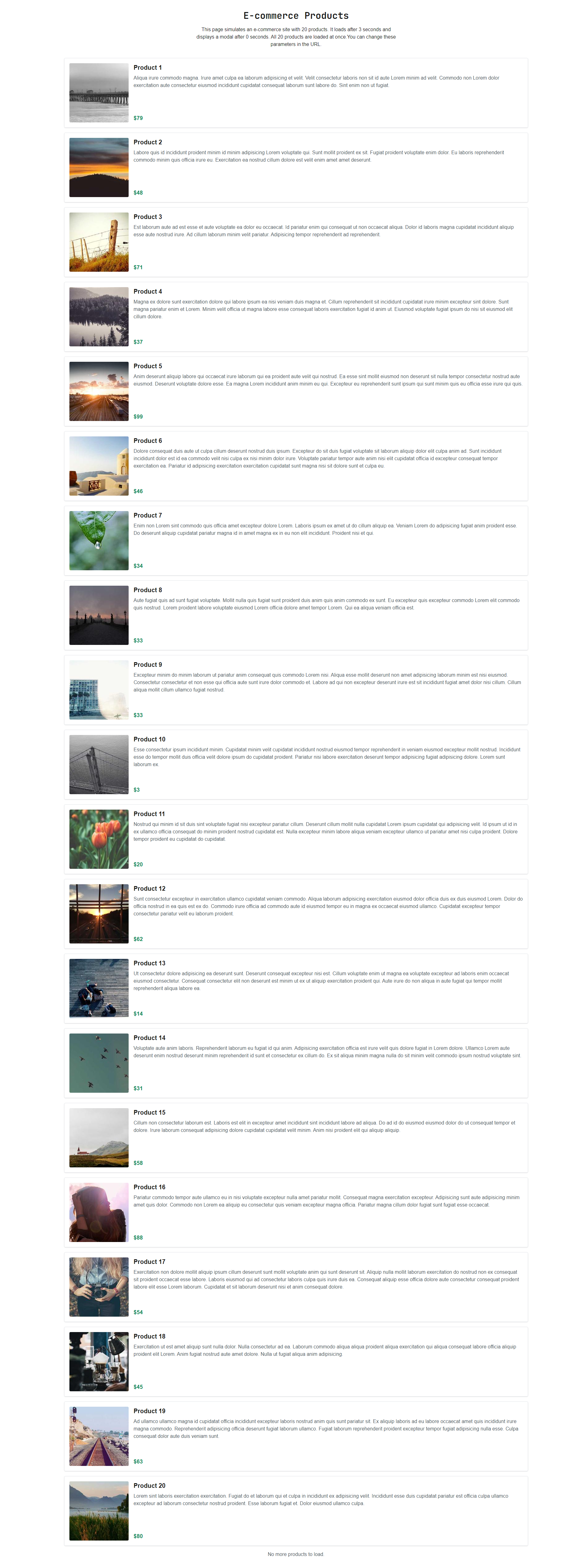
## Response

The full-height export screenshot of the page showing all items.

<figure><img src="/files/0LO0yUUFYs5oxo4HnGOz" alt=""><figcaption><p>Gaffa's full height screenshot</p></figcaption></figure>


# Automated Form Filling

An example request that uses Gaffa to automate the completion of a form and waits for a success modal to appear.

*The following example is a request we've prebuilt to show you Gaffa's capabilities on our* [*demo site.*](https://demo.gaffa.dev) ***You can run this request right now in the*** [***Gaffa API Playground***](https://gaffa.dev/dashboard/playground?templateId=form_fill)***.***

## API Request

```json
{
  "url": "https://demo.gaffa.dev/simulate/form?loadTime=3&showModal=false&modalDelay=0&formType=address&firstName=John&lastName=Doe&address1=123%20Main%20Street&city=London&country=UK",
  "proxy_location": null,
  "async": false,
  "max_cache_age": 0,
  "settings": {
    "record_request": true,
    "actions": [
      {
        "type": "type",
        "selector": "#email",
        "text": "johndoe@example.com"
      },
      {
        "type": "type",
        "selector": "#state",
        "text": "CA"
      },
      {
        "type": "type",
        "selector": "#zipCode",
        "text": "12345"
      },
      {
        "type": "click",
        "selector": "button[type='submit']"
      },
      {
        "type": "wait",
        "selector": "[role=\"dialog\"] h2:has-text(\"Success!\")",
        "timeout": 10000
      }
    ]
  }
}
```

## Actions

{% content-ref url="/pages/TjjKKIilt0eFTzDDyZdD" %}
[Type](/docs/features/browser-requests/actions/type)
{% endcontent-ref %}

{% content-ref url="/pages/1Cx0fCd84ZhpvRD9FVxt" %}
[Click](/docs/features/browser-requests/actions/click)
{% endcontent-ref %}

{% content-ref url="/pages/Py3syTPEzIuvQYXyaDso" %}
[Wait](/docs/features/browser-requests/actions/wait)
{% endcontent-ref %}

## Response

Here's a video showing Gaffa filling out the page and waiting for the success modal.

{% embed url="<https://youtu.be/TGPnuc-71Bs>" %}
Gaffa can help automatically fill out your forms!
{% endembed %}

## Read More

Read more about screen recording here (TODO).


# Parse PDF to Structured JSON

An example request that uses Gaffa to extract structured data from an online PDF.

The following example is a request we've pre-built to show you Gaffa's capabilities against our [demo site](https://demo.gaffa.dev). You can run this request right here in the [Gaffa API Playground](https://gaffa.dev/dashboard/playground).

This example demonstrates how to extract data from PDF documents. Gaffa downloads the PDF and uses AI to intelligently parse the content according to your schema, making it perfect for building research databases, citation managers, or literature review tools.

**This feature currently works for online PDFs.**

## API Request

The request below uses the [POST endpoint](https://gaffa.dev/docs/api-reference/post-v1-browser-requests) to download a demo research paper from the hosted PDFs, wait for it to load, and then parse the first page to extract author information and paper metadata.

```json
{
  "url": "https://demo.gaffa.dev/simulate/pdf/ReasoningAboutActionAndChange.pdf",
  "proxy_location": null,
  "async": false,
  "max_cache_age": 0,
  "settings": {
    "record_request": false,
    "actions": [
      {
        "type": "download_file"
      },
      {
        "type": "parse_json",
        "data_schema": {
          "name": "AcademicPaper",
          "description": "Schema for parsing academic paper summary and author information",
          "fields": [
            {
              "type": "string",
              "name": "title",
              "description": "The full title of the academic paper"
            },
            {
              "type": "string",
              "name": "abstract",
              "description": "The paper's abstract or summary"
            },
            {
              "type": "array",
              "name": "authors",
              "description": "List of authors who contributed to the paper",
              "fields": [
                {
                  "type": "string",
                  "name": "name",
                  "description": "Author's full name as it appears in the paper"
                },
                {
                  "type": "array",
                  "name": "affiliations",
                  "description": "Institutional affiliations for this author",
                  "fields": [
                    {
                      "type": "string",
                      "name": "institution",
                      "description": "Name of the university or research institution"
                    },
                    {
                      "type": "string",
                      "name": "department",
                      "description": "Department or division name"
                    },
                    {
                      "type": "string",
                      "name": "city",
                      "description": "City where the institution is located"
                    },
                    {
                      "type": "string",
                      "name": "country",
                      "description": "Country of the institution"
                    }
                  ]
                },
                {
                  "type": "string",
                  "name": "email",
                  "description": "Author's contact email address if provided"
                }
              ]
            },
            {
              "type": "array",
              "name": "keywords",
              "description": "Key terms and topics covered in the paper",
              "fields": [
                {
                  "type": "string",
                  "name": "keyword",
                  "description": "Individual keyword or phrase"
                }
              ]
            }
          ]
        },
        "instruction": "Parse this academic paper focusing on the title, abstract, author information, and keywords typically found on the first page. Extract all author names, their institutional affiliations with department and location details, and their contact information.",
        "model": "gpt-4o-mini",
        "output_type": "inline",
        "max_pages": 1
      }
    ]
  }
}
```

## Actions

{% content-ref url="/pages/FvBSaG7VbCnEutHxcCj2" %}
[Download File](/docs/features/browser-requests/actions/download-file)
{% endcontent-ref %}

{% content-ref url="/pages/7bb96jtp13gAqQoJ3aqV" %}
[Parse JSON](/docs/features/browser-requests/actions/parse-json)
{% endcontent-ref %}

## Response

The parsed data is returned as a structured JSON object matching your schema:

```json
{
    "data": {
        "id": "brq_VYfyVifa26oMpmX4YDeNN3iJDrhK3a",
        "url": "https://demo.gaffa.dev/simulate/pdf/ReasoningAboutActionAndChange.pdf",
        "state": "completed",
        "credit_usage": 0,
        "http_status_code": 200,
        "from_cache": false,
        "started_at": "2025-12-01T06:09:43.6125439Z",
        "completed_at": "2025-12-01T06:09:57.5453161Z",
        "running_time": "00:00:13.9327722",
        "page_load_time": "00:00:00.8959680",
        "actions": [
            {
                "id": "act_VYfyVhGPwQjur9XAu5XA47n2FozYfK",
                "type": "download_file",
                "timestamp": "2025-12-01T06:09:46.509484Z",
                "output": "https://storage.gaffa.dev/brq/downloads/brq_VYfyVifa26oMpmX4YDeNN3iJDrhK3a/ReasoningAboutActionAndChange.pdf"
            },
            {
                "id": "act_VYfyVjNHWzECbraio6xS6MqhYhiDWP",
                "type": "parse_json",
                "timestamp": "2025-12-01T06:09:57.5453056Z",
                "output": {
                    "title": "Reasoning about Action and Change",
                    "abstract": "This chapter presents the state of research concerning the formalisation of an agent reasoning about a dynamic system which can be partially observed and acted upon. We first define the basic concepts of the area: system states, ontic and epistemic actions, observations; then the basic reasoning processes: prediction, progression, regression, postdiction, filtering, abduction, and extrapolation. We then recall the classical action representation problems and show how these problems are solved in some standard frameworks. For space reasons, we focus on these major settings: the situation calculus, STRIPS and some propositional action languages, dynamic logic, and dynamic Bayesian networks. We finally address a special case of progression, namely belief update.",
                    "authors": [
                        {
                            "name": "Florence Dupin de Saint-Cyr",
                            "affiliations": [
                                {
                                    "institution": "IRIT-CNRS. Université Paul Sabatier",
                                    "department": "",
                                    "city": "Toulouse",
                                    "country": "France"
                                }
                            ],
                            "email": ""
                        },
                        {
                            "name": "Andreas Herzig",
                            "affiliations": [
                                {
                                    "institution": "IRIT-CNRS. Université Paul Sabatier",
                                    "department": "",
                                    "city": "Toulouse",
                                    "country": "France"
                                }
                            ],
                            "email": ""
                        },
                        {
                            "name": "Jérôme Lang",
                            "affiliations": [
                                {
                                    "institution": "CNRS, Université Paris-Dauphine, PSL Research University, LAMSADE",
                                    "department": "",
                                    "city": "Paris",
                                    "country": "France"
                                }
                            ],
                            "email": ""
                        },
                        {
                            "name": "Pierre Marquis",
                            "affiliations": [
                                {
                                    "institution": "CRIL-CNRS, Université d’Artois & Institut Universitaire de France",
                                    "department": "",
                                    "city": "Lens",
                                    "country": "France"
                                }
                            ],
                            "email": ""
                        }
                    ],
                    "keywords": []
                },
                "reference": "https://storage.gaffa.dev/brq/downloads/brq_VYfyVifa26oMpmX4YDeNN3iJDrhK3a/ReasoningAboutActionAndChange.pdf"
            }
        ]
    }
}
```


# Parse HTML Form to Structured JSON

An example request that uses Gaffa to analyze a web form and extract all input fields, their labels, types, and properties into structured JSON.

The following example is a request we've pre-built to show you Gaffa's capabilities against our [demo site](https://demo.gaffa.dev). You can run this request right here in the [Gaffa API Playground](https://gaffa.dev/dashboard/playground).

This example demonstrates how to extract structured information from HTML forms on web pages. Gaffa uses AI to identify form elements and their properties, making it perfect for form automation, testing, accessibility audits, or building form-filling assistants.

## API Request

The request below uses the [POST endpoint](https://gaffa.dev/docs/api-reference/post-v1-browser-requests) to open the demo form page, wait for the modal to appear, and then parse the visible form to extract all field information, including labels, input names, placeholders, and dropdown options.

```json
{
  "url": "https://demo.gaffa.dev/simulate/form?loadTime=3&showModal=true&modalDelay=5&formType=address",
  "proxy_location": null,
  "async": false,
  "max_cache_age": 0,
  "settings": {
    "record_request": false,
    "actions": [
      {
        "type": "parse_json",
        "data_schema": {
          "name": "AddressFormSchema",
          "description": "Extracts fields, labels, and placeholders from the demo address form",
          "fields": [
            {
              "type": "string",
              "name": "form_title",
              "description": "The heading or title of the form"
            },
            {
              "type": "object",
              "name": "full_name",
              "description": "Full name input field",
              "fields": [
                {
                  "type": "string",
                  "name": "label",
                  "description": "The visible label text"
                },
                {
                  "type": "string",
                  "name": "placeholder",
                  "description": "Placeholder text shown in the input"
                },
                {
                  "type": "string",
                  "name": "input_name",
                  "description": "The name attribute of the input element"
                }
              ]
            },
            {
              "type": "object",
              "name": "address_line_1",
              "description": "First address line input field",
              "fields": [
                {
                  "type": "string",
                  "name": "label",
                  "description": "The visible label text"
                },
                {
                  "type": "string",
                  "name": "placeholder",
                  "description": "Placeholder text shown in the input"
                },
                {
                  "type": "string",
                  "name": "input_name",
                  "description": "The name attribute of the input element"
                }
              ]
            },
            {
              "type": "object",
              "name": "address_line_2",
              "description": "Second address line input field",
              "fields": [
                {
                  "type": "string",
                  "name": "label",
                  "description": "The visible label text"
                },
                {
                  "type": "string",
                  "name": "placeholder",
                  "description": "Placeholder text shown in the input"
                },
                {
                  "type": "string",
                  "name": "input_name",
                  "description": "The name attribute of the input element"
                }
              ]
            },
            {
              "type": "object",
              "name": "city",
              "description": "City input field",
              "fields": [
                {
                  "type": "string",
                  "name": "label",
                  "description": "The visible label text"
                },
                {
                  "type": "string",
                  "name": "placeholder",
                  "description": "Placeholder text shown in the input"
                },
                {
                  "type": "string",
                  "name": "input_name",
                  "description": "The name attribute of the input element"
                }
              ]
            },
            {
              "type": "object",
              "name": "postcode",
              "description": "Postcode or ZIP code input field",
              "fields": [
                {
                  "type": "string",
                  "name": "label",
                  "description": "The visible label text"
                },
                {
                  "type": "string",
                  "name": "placeholder",
                  "description": "Placeholder text shown in the input"
                },
                {
                  "type": "string",
                  "name": "input_name",
                  "description": "The name attribute of the input element"
                }
              ]
            },
            {
              "type": "object",
              "name": "country",
              "description": "Country selection dropdown",
              "fields": [
                {
                  "type": "string",
                  "name": "label",
                  "description": "The visible label text"
                },
                {
                  "type": "string",
                  "name": "input_name",
                  "description": "The name attribute of the select element"
                },
                {
                  "type": "array",
                  "name": "options",
                  "description": "Available country options in the dropdown",
                  "fields": [
                    {
                      "type": "string",
                      "name": "value",
                      "description": "The option value or text"
                    }
                  ]
                }
              ]
            }
          ]
        },
        "instruction": "Extract all visible form fields from this address form, including their labels, input names, placeholders, and for dropdown fields, list all available options.",
        "model": "gpt-4o-mini",
        "output_type": "inline"
      }
    ]
  }
}
```

## Actions

{% content-ref url="/pages/7bb96jtp13gAqQoJ3aqV" %}
[Parse JSON](/docs/features/browser-requests/actions/parse-json)
{% endcontent-ref %}

## Response

The parsed form data is returned as a structured JSON object:

```json
{
    "data": {
        "id": "brq_VYg5H56A7m4vLJTdzj2jB3MgTAfT7K",
        "url": "https://demo.gaffa.dev/simulate/form?loadTime=3&showModal=true&modalDelay=5&formType=address",
        "state": "completed",
        "credit_usage": 0,
        "http_status_code": 200,
        "from_cache": false,
        "started_at": "2025-12-01T06:40:15.9241312Z",
        "completed_at": "2025-12-01T06:40:23.7495525Z",
        "running_time": "00:00:07.8254213",
        "page_load_time": "00:00:00.3124478",
        "actions": [
            {
                "id": "act_VYg5HDUFBrWq1GdmhQruRq4Gp7hjAk",
                "type": "parse_json",
                "timestamp": "2025-12-01T06:40:23.7495396Z",
                "output": {
                    "form_title": "Address Form",
                    "full_name": {
                        "label": "Full Name",
                        "placeholder": "Enter your full name",
                        "input_name": "full_name"
                    },
                    "address_line_1": {
                        "label": "Address Line 1",
                        "placeholder": "Enter your address",
                        "input_name": "address_line_1"
                    },
                    "address_line_2": {
                        "label": "Address Line 2",
                        "placeholder": "Optional",
                        "input_name": "address_line_2"
                    },
                    "city": {
                        "label": "City",
                        "placeholder": "Enter your city",
                        "input_name": "city"
                    },
                    "postcode": {
                        "label": "Postcode",
                        "placeholder": "Enter your postcode",
                        "input_name": "postcode"
                    },
                    "country": {
                        "label": "Country",
                        "input_name": "country",
                        "options": [
                            {
                                "value": "United States"
                            },
                            {
                                "value": "Canada"
                            },
                            {
                                "value": "United Kingdom"
                            },
                            {
                                "value": "Australia"
                            },
                            {
                                "value": "Germany"
                            }
                        ]
                    }
                },
                "reference": "https://storage.gaffa.dev/brq/dom/brq_VYg5H56A7m4vLJTdzj2jB3MgTAfT7K/act_VYg5HDUFBrWq1GdmhQruRq4Gp7hjAk_raw.txt"
            }
        ]
    }
}
```


# Parse an HTML Table to JSON

An example request that uses Gaffa to extract structured data (JSON) from a table on a webpage

The following example is a prebuilt request that demonstrates Gaffa's capabilities on our [demo site](https://demo.gaffa.dev/). You can run this request right here in the [Gaffa API Playground](https://gaffa.dev/dashboard/playground).&#x20;

This example demonstrates how to extract tabular data from any webpage without writing a scraper. Gaffa renders the page using a real browser, waits for the table to load, and returns the rows as a clean JSON array, making it perfect for building data pipelines, monitoring dashboards, or feeding structured data into LLM workflows.&#x20;

## API Request

The request below uses the [POST endpoint](https://gaffa.dev/docs/api-reference/post-v1-browser-requests) to load a demo table page, waits for the table element to appear, and parses each row into a structured JSON array, using the table's header row as property names.&#x20;

```json
{
  "url": "https://demo.gaffa.dev/simulate/table?loadTime=1&rowCount=3",
  "proxy_location": null,
  "async": false,
  "max_cache_age": 0,
  "settings": {
    "record_request": false,
    "actions": [
      {
        "type": "wait",
        "selector": "table",
        "timeout": 5000
      },
      {
        "type": "parse_table",
        "selector": "table"
      }
    ]
  }
}
```

## Actions

{% content-ref url="/pages/Py3syTPEzIuvQYXyaDso" %}
[Wait](/docs/features/browser-requests/actions/wait)
{% endcontent-ref %}

{% content-ref url="/pages/k6OW4oynrx9l5KvPURSV" %}
[Parse Table](/docs/features/browser-requests/actions/parse-table)
{% endcontent-ref %}

## Response

The `parse_table` action returns an `output` URL pointing to the extracted JSON:

```json
{
  "data": {
    "id": "brq_abc123ExampleRequestId",
    "url": "https://demo.gaffa.dev/simulate/table?loadTime=1&rowCount=10",
    "state": "completed",
    "credit_usage": 1,
    "http_status_code": 200,
    "from_cache": false,
    "started_at": "2025-06-09T12:00:00.000Z",
    "completed_at": "2025-06-09T12:00:04.321Z",
    "running_time": "00:00:04.3210000",
    "page_load_time": "00:00:01.1230000",
    "actions": [
      {
        "id": "act_wait001",
        "type": "wait",
        "query": "wait?selector=table&timeout=5000&continue_on_fail=false",
        "timestamp": "2025-06-09T12:00:01.500Z"
      },
      {
        "id": "act_parse001",
        "type": "parse_table",
        "query": "parse_table?selector=table",
        "timestamp": "2025-06-09T12:00:01.600Z",
        "output": "https://storage.gaffa.dev/brq/results/brq_abc123ExampleRequestId/act_parse001_table.json"
      }
    ]
  }
}
```

Fetching that URL gives you the table rows as a ready-to-use array:

```json
[
  {
    "id": "1",
    "name": "Item 1",
    "quantity": "30",
    "price": "$56.05"
  },
  {
    "id": "2",
    "name": "Item 2",
    "quantity": "68",
    "price": "$76.89"
  },
  {
    "id": "3",
    "name": "Item 3",
    "quantity": "67",
    "price": "$20.44"
  }
]
```


# Mapping Requests

Mapping requests allow you to extract all URLs from a website's sitemap. Gaffa mapping requests have the following useful features:

* **Sitemap Discovery:** No need to manually find a site's sitemap URL; we'll find it automatically.
* **Caching:** If you or another Gaffa user has retrieved a sitemap within a defined timeframe, we'll quickly return the cached data instead of fetching it again.
* **Index Traversal:** If the sitemap references other sitemap files, we'll automatically process each one and add its URLs to the list, ensuring the entire hierarchy is captured.
* **Aggregation and Duplicate Prevention:** In rare cases where the sitemap contains duplicate entries, we'll automatically remove them for you and return all URLs sorted alphabetically.&#x20;
* **Proxies:** Gaffa uses its residential proxies behind the scenes to ensure your sitemap retrieval requests aren't blocked.

## Example Request

The [POST v1/site/map](/docs/api-reference/post-v1-site-map) endpoint allows you to create a new request and await the result. It's a request with a simple payload containing the URL of the site you want to extract the sitemap of, and a `max_cache_age` in milliseconds, you would accept a response returned from the cache; the default is 0, and Gaffa will never return a cached response when used.

```json
{
  "url": "https://gaffa.dev",
  "max_cache_age": 10000
}
```

{% hint style="info" %}
The request currently has a maximum running time of 60 seconds, after which an error will be returned.
{% endhint %}

For the Gaffa site, this will return the following response:

<pre class="language-json"><code class="lang-json">{
  "data": {
    "id": "smr_VQW4E66TdcQFZfCs6qavgdowPj3Bzk",
    "url": "https://gaffa.dev",
    "state": "completed",
    "credit_usage": 1,
    "from_cache": true,
    "started_at": "2025-08-22T11:05:43.328175Z",
    "completed_at": "2025-08-22T11:05:47.857941Z",
    "running_time": "00:00:04.5297660",
    "links": [
      "https://gaffa.dev",
      "https://gaffa.dev/about",
      "https://gaffa.dev/blog",
      "https://gaffa.dev/blog/convert-any-web-page-to-llm-ready-markdown-using-gaffa",
      "https://gaffa.dev/blog/how-to-extract-and-simplify-a-webpage-dom-with-gaffa",
      "https://gaffa.dev/blog/printing-webpages-to-pdf-html-to-pdf-using-gaffa",
      "https://gaffa.dev/docs",
      "https://gaffa.dev/docs/api-reference/api-authentication",
      ....and so on
    ],
    "link_count": 52
  }
<strong>}
</strong></code></pre>

As you'll see from the [API Reference section](/docs/api-reference/api-authentication) of the site, there are also requests to retrieve site mapping requests for your account.

## Pricing

See the [Credits and Pricing page](/docs/credits-and-pricing) for the current cost of mapping requests.


# API Authentication

We use API Keys for authenticating requests to our API. In this document we'll explain how you can manage and use the keys for your account.

## Creating Keys

Once your account is approved, you will need to create an API key to send your requests to our API. \
\
Go to your account [**Dashboard > API Keys**](https://gaffa.dev/dashboard/api-tokens) and create a new key with a name. Once the key is created, copy the value, and you can immediately start using it to make requests.

{% hint style="info" %}
You can create as many keys as you wish, but always remember to treat the key as a secret and do not reveal it in public blog posts or GitHub repositories. If someone uses your leaked key to make requests, we won't be responsible!
{% endhint %}

## Deleting Keys

If you are worried you have exposed your Gaffa API key, or just want to periodically rotate your keys, you can create a new key and then delete your old keys. Deleted keys will immediately stop working for new API requests, but past browser requests made using old keys will still be available.

## Authenticating Requests

Our API is secured with a customer header `X-API-Key` whose value should be any current API key in your account. That's all you need to add to your request!


# POST v1/browser/requests

{% hint style="info" %}
For more information on browser requests, [see here](/docs/features/browser-requests).
{% endhint %}

The following endpoint creates a browser request and either runs it synchronously or returns immediately with an ID so you can check its status later.

## Create a new browser request

> This endpoint loads the required URL in our browser and then performs the selected actions.

```json
{"openapi":"3.0.1","info":{"title":"Gaffa API Open API Definition","version":"1.0.0"},"servers":[{"url":"https://api.gaffa.dev"}],"security":[{"API Key":[]}],"components":{"securitySchemes":{"API Key":{"type":"apiKey","name":"X-API-Key","in":"header"}},"schemas":{"browserRequestInput_object":{"type":"object","properties":{"proxy_location":{"type":"string","description":"The location of the proxy server that your request will be routed through, null means no proxy is used","default":"null","nullable":true},"url":{"type":"string","description":"The url you want our browsers to visit on your behalf"},"async":{"type":"boolean","description":"Whether the request should be processed asynchronously, synchronous requests can be maximum 60 seconds long.","default":true},"max_cache_age":{"type":"integer","description":"The maximum age of a cached result in seconds. 0 means the cache will never be used","format":"int32","default":0,"nullable":true},"settings":{"$ref":"#/components/schemas/browserRequestSettings_object"}}},"browserRequestSettings_object":{"type":"object","properties":{"record_request":{"type":"boolean","description":"Record a video of this request","default":false,"nullable":true},"actions":{"type":"array","items":{"$ref":"#/components/schemas/dictionary_object"},"description":"A list of the functions you want to perform on the web page"},"time_limit":{"type":"integer","description":"Cap the maximum time the request should take to complete, in milliseconds (default: 60000)","format":"int32","default":60000,"nullable":true},"max_media_bandwidth":{"type":"integer","description":"Cap the maximum bandwidth to use for media downloads, in MB","format":"int32","nullable":true},"output":{"$ref":"#/components/schemas/browserRequestOutput"},"block_ads":{"type":"boolean","description":"Enable ad blocking for this request","default":false,"nullable":true}},"description":"The actions and outputs you want to be executed"},"dictionary_object":{"type":"object","additionalProperties":{"type":"object"}},"browserRequestOutput":{"type":"object","properties":{"webhook_url":{"type":"string","description":"Webhook URL to receive results","nullable":true}},"description":"Output configuration for the request (restricted to integration requests)","nullable":true},"browserRequestResponse":{"type":"object","properties":{"id":{"type":"string","description":"ID of the browser request","nullable":true},"url":{"type":"string","description":"URL of the request","nullable":true},"proxy_location":{"type":"string","description":"The proxy location of the request.","nullable":true},"state":{"type":"string","description":"The status of the request","nullable":true},"credit_usage":{"type":"integer","description":"The number of credits used by the request","format":"int32","nullable":true},"error":{"type":"string","description":"The name of the error type","nullable":true},"error_reason":{"type":"string","description":"More detail about the error","nullable":true},"actual_url":{"type":"string","description":"The actual URL captured, after any redirects.","nullable":true},"http_status_code":{"type":"integer","description":"The http status code for the request.","format":"int32"},"from_cache":{"type":"boolean","description":"If this request was served from the cached","nullable":true},"started_at":{"type":"string","description":"The time in UTC when the request started.","format":"date-time"},"completed_at":{"type":"string","description":"The time in UTC when the request finished.","format":"date-time"},"running_time":{"type":"string","description":"The running time of the request","format":"timespan"},"page_load_time":{"type":"string","description":"How long did the page take to fully render.","format":"timespan"},"actions":{"type":"array","items":{"$ref":"#/components/schemas/browerRequestActionResponse"},"description":"Actions carried out and their results","nullable":true},"video":{"type":"string","description":"Video url","nullable":true}}},"browerRequestActionResponse":{"type":"object","properties":{"id":{"type":"string","description":"ID of the action","nullable":true},"type":{"type":"string","description":"Name of the action","nullable":true},"custom_id":{"type":"string","description":"Custom ID of the action","nullable":true},"timestamp":{"type":"string","description":"Time the action was initiated","format":"date-time"},"output":{"type":"object","description":"Ouput of the action, if any","nullable":true},"reference":{"type":"string","description":"Reference file for the action, if any","nullable":true},"iterations":{"type":"integer","description":"Number of iterations completed for loop actions","format":"int32"},"actions":{"type":"array","items":{"$ref":"#/components/schemas/browerRequestActionResponse"},"description":"Nested actions executed within loop actions","nullable":true},"error":{"type":"string","description":"Error message, if any","nullable":true}}},"apiErrorResponse":{"type":"object","properties":{"type":{"type":"string","description":"The type of object this is concerning","nullable":true},"id":{"type":"string","description":"The id of the item concerned.","nullable":true},"code":{"type":"string","description":"Error code.","nullable":true},"message":{"type":"string","description":"Error description.","nullable":true}}}}},"paths":{"/v1/browser/requests":{"post":{"tags":["Browser Requests"],"summary":"Create a new browser request","description":"This endpoint loads the required URL in our browser and then performs the selected actions.","operationId":"createBrowserRequest","requestBody":{"description":"Browser request input data","content":{"application/json":{"schema":{"$ref":"#/components/schemas/browserRequestInput_object"}}},"required":true},"responses":{"200":{"description":"The browser request response detailing the state and output of the request","content":{"application/json":{"schema":{"$ref":"#/components/schemas/browserRequestResponse"}}}},"408":{"description":"The browser request timed out - an example error","content":{"application/json":{"schema":{"$ref":"#/components/schemas/apiErrorResponse"}}}}}}}}}
```


# GET v1/browser/requests/{id}

{% hint style="info" %}
For more information on browser requests, [see here](/docs/features/browser-requests).
{% endhint %}

The following endpoint allows you to query the browser request for your account by ID.

## Get a browser request by ID

> This endpoint retrieves a browser request by its ID.

```json
{"openapi":"3.0.1","info":{"title":"Gaffa API Open API Definition","version":"1.0.0"},"servers":[{"url":"https://api.gaffa.dev"}],"security":[{"API Key":[]}],"components":{"securitySchemes":{"API Key":{"type":"apiKey","name":"X-API-Key","in":"header"}},"schemas":{"browserRequestResponse":{"type":"object","properties":{"id":{"type":"string","description":"ID of the browser request","nullable":true},"url":{"type":"string","description":"URL of the request","nullable":true},"proxy_location":{"type":"string","description":"The proxy location of the request.","nullable":true},"state":{"type":"string","description":"The status of the request","nullable":true},"credit_usage":{"type":"integer","description":"The number of credits used by the request","format":"int32","nullable":true},"error":{"type":"string","description":"The name of the error type","nullable":true},"error_reason":{"type":"string","description":"More detail about the error","nullable":true},"actual_url":{"type":"string","description":"The actual URL captured, after any redirects.","nullable":true},"http_status_code":{"type":"integer","description":"The http status code for the request.","format":"int32"},"from_cache":{"type":"boolean","description":"If this request was served from the cached","nullable":true},"started_at":{"type":"string","description":"The time in UTC when the request started.","format":"date-time"},"completed_at":{"type":"string","description":"The time in UTC when the request finished.","format":"date-time"},"running_time":{"type":"string","description":"The running time of the request","format":"timespan"},"page_load_time":{"type":"string","description":"How long did the page take to fully render.","format":"timespan"},"actions":{"type":"array","items":{"$ref":"#/components/schemas/browerRequestActionResponse"},"description":"Actions carried out and their results","nullable":true},"video":{"type":"string","description":"Video url","nullable":true}}},"browerRequestActionResponse":{"type":"object","properties":{"id":{"type":"string","description":"ID of the action","nullable":true},"type":{"type":"string","description":"Name of the action","nullable":true},"custom_id":{"type":"string","description":"Custom ID of the action","nullable":true},"timestamp":{"type":"string","description":"Time the action was initiated","format":"date-time"},"output":{"type":"object","description":"Ouput of the action, if any","nullable":true},"reference":{"type":"string","description":"Reference file for the action, if any","nullable":true},"iterations":{"type":"integer","description":"Number of iterations completed for loop actions","format":"int32"},"actions":{"type":"array","items":{"$ref":"#/components/schemas/browerRequestActionResponse"},"description":"Nested actions executed within loop actions","nullable":true},"error":{"type":"string","description":"Error message, if any","nullable":true}}},"apiErrorResponse":{"type":"object","properties":{"type":{"type":"string","description":"The type of object this is concerning","nullable":true},"id":{"type":"string","description":"The id of the item concerned.","nullable":true},"code":{"type":"string","description":"Error code.","nullable":true},"message":{"type":"string","description":"Error description.","nullable":true}}}}},"paths":{"/v1/browser/requests/{id}":{"get":{"tags":["Browser Requests"],"summary":"Get a browser request by ID","description":"This endpoint retrieves a browser request by its ID.","operationId":"getBrowserRequestById","parameters":[{"name":"id","in":"path","description":"The unique identifier of the browser request to retrieve.","required":true,"schema":{"type":"string"}},{"name":"id","in":"query","description":"The unique identifiers of the browser request to retrieve.","required":true,"schema":{"type":"string"}}],"responses":{"200":{"description":"The browser request","content":{"application/json":{"schema":{"$ref":"#/components/schemas/browserRequestResponse"}}}},"404":{"description":"Browser request not found","content":{"application/json":{"schema":{"$ref":"#/components/schemas/apiErrorResponse"}}}}}}}}}
```


# GET v1/browser/requests

{% hint style="info" %}
For more information on browser requests, [see here](/docs/features/browser-requests).
{% endhint %}

The following endpoint allows you to query for multiple browser requests, either by status or a list of particular ids, submitting a request with neither of these will return all requests for your account.

## Get multiple browser requests

> This endpoint retrieves browser requests in bulk by id or status.

```json
{"openapi":"3.0.1","info":{"title":"Gaffa API Open API Definition","version":"1.0.0"},"servers":[{"url":"https://api.gaffa.dev"}],"security":[{"API Key":[]}],"components":{"securitySchemes":{"API Key":{"type":"apiKey","name":"X-API-Key","in":"header"}},"schemas":{"pagedResult_browserRequestResponse":{"type":"object","properties":{"total_pages":{"type":"integer","description":"The total number of pages available","format":"int32","nullable":true},"total_records":{"type":"integer","description":"The total number of records across all pages","format":"int32","nullable":true},"results":{"type":"array","items":{"$ref":"#/components/schemas/browserRequestResponse"},"description":"The records for the current page","nullable":true},"page":{"type":"integer","description":"The page number to return (1-based)","format":"int32","default":1,"nullable":true},"page_size":{"type":"integer","description":"The number of records to return per page","format":"int32","default":30,"nullable":true}}},"browserRequestResponse":{"type":"object","properties":{"id":{"type":"string","description":"ID of the browser request","nullable":true},"url":{"type":"string","description":"URL of the request","nullable":true},"proxy_location":{"type":"string","description":"The proxy location of the request.","nullable":true},"state":{"type":"string","description":"The status of the request","nullable":true},"credit_usage":{"type":"integer","description":"The number of credits used by the request","format":"int32","nullable":true},"error":{"type":"string","description":"The name of the error type","nullable":true},"error_reason":{"type":"string","description":"More detail about the error","nullable":true},"actual_url":{"type":"string","description":"The actual URL captured, after any redirects.","nullable":true},"http_status_code":{"type":"integer","description":"The http status code for the request.","format":"int32"},"from_cache":{"type":"boolean","description":"If this request was served from the cached","nullable":true},"started_at":{"type":"string","description":"The time in UTC when the request started.","format":"date-time"},"completed_at":{"type":"string","description":"The time in UTC when the request finished.","format":"date-time"},"running_time":{"type":"string","description":"The running time of the request","format":"timespan"},"page_load_time":{"type":"string","description":"How long did the page take to fully render.","format":"timespan"},"actions":{"type":"array","items":{"$ref":"#/components/schemas/browerRequestActionResponse"},"description":"Actions carried out and their results","nullable":true},"video":{"type":"string","description":"Video url","nullable":true}}},"browerRequestActionResponse":{"type":"object","properties":{"id":{"type":"string","description":"ID of the action","nullable":true},"type":{"type":"string","description":"Name of the action","nullable":true},"custom_id":{"type":"string","description":"Custom ID of the action","nullable":true},"timestamp":{"type":"string","description":"Time the action was initiated","format":"date-time"},"output":{"type":"object","description":"Ouput of the action, if any","nullable":true},"reference":{"type":"string","description":"Reference file for the action, if any","nullable":true},"iterations":{"type":"integer","description":"Number of iterations completed for loop actions","format":"int32"},"actions":{"type":"array","items":{"$ref":"#/components/schemas/browerRequestActionResponse"},"description":"Nested actions executed within loop actions","nullable":true},"error":{"type":"string","description":"Error message, if any","nullable":true}}},"apiErrorResponse":{"type":"object","properties":{"type":{"type":"string","description":"The type of object this is concerning","nullable":true},"id":{"type":"string","description":"The id of the item concerned.","nullable":true},"code":{"type":"string","description":"Error code.","nullable":true},"message":{"type":"string","description":"Error description.","nullable":true}}}}},"paths":{"/v1/browser/requests":{"get":{"tags":["Browser Requests"],"summary":"Get multiple browser requests","description":"This endpoint retrieves browser requests in bulk by id or status.","operationId":"getBrowserRequest","parameters":[{"name":"ids","in":"query","description":"The unique identifiers of the browser requests to retrieve.","schema":{"type":"string"}},{"name":"status","in":"query","description":"The statuses of the browser requests to filter by. Valid values: pending, running, completed, failed","schema":{"type":"string"}},{"name":"pageSize","in":"query","description":"Items to return per page (default: 30).","schema":{"type":"integer","format":"int32"}},{"name":"page","in":"query","description":"Page number of the pagination (default: 1).","schema":{"type":"integer","format":"int32"}},{"name":"ids","in":"query","description":"The unique identifiers of the browser requests to retrieve.","schema":{"type":"string"}},{"name":"status","in":"query","description":"The statuses of the browser requests to filter by.","schema":{"type":"string"}},{"name":"pageSize","in":"query","description":"Items to return per page (default: 30).","schema":{"type":"integer","format":"int32"}},{"name":"page","in":"query","description":"Page number of the pagination.","schema":{"type":"integer","format":"int32"}}],"responses":{"200":{"description":"A collection of browser requests that match the criteria","content":{"application/json":{"schema":{"$ref":"#/components/schemas/pagedResult_browserRequestResponse"}}}},"400":{"description":"Invalid query parameters","content":{"application/json":{"schema":{"$ref":"#/components/schemas/apiErrorResponse"}}}}}}}}}
```


# POST v1/schemas

{% hint style="danger" %}
**Beta Feature:** This feature is currently in beta and restricted to approved users. If you're are interested in trying it, please [contact support](https://gaffa.dev/support) and we can enable this feature for your account.
{% endhint %}

The following endpoint allows you to describe a data schema for parsing an online PDF to JSON.

## Create a new data schema

> Creates a new data schema definition and returns the created schema.

```json
{"openapi":"3.0.1","info":{"title":"Gaffa API Open API Definition","version":"1.0.0"},"servers":[{"url":"https://api.gaffa.dev"}],"security":[{"API Key":[]}],"components":{"securitySchemes":{"API Key":{"type":"apiKey","name":"X-API-Key","in":"header"}},"schemas":{"dataSchema":{"type":"object","properties":{"id":{"type":"string","description":"The unique identifier for the data schema.","nullable":true},"name":{"type":"string","description":"The name of the schema or field.","nullable":true},"description":{"type":"string","description":"A description of the schema or field.","nullable":true},"fields":{"type":"array","items":{"$ref":"#/components/schemas/schemaField"},"description":"The list of fields that make up this object.","nullable":true}}},"schemaField":{"type":"object","properties":{"type":{"enum":[0,1,2,3,4,5,6,7],"type":"integer","description":"The type of the field.","format":"int32"},"name":{"type":"string","description":"The name of the schema or field.","nullable":true},"description":{"type":"string","description":"A description of the schema or field.","nullable":true},"fields":{"type":"array","items":{"$ref":"#/components/schemas/schemaField"},"description":"The list of fields that make up this object.","nullable":true}}}}},"paths":{"/v1/schemas":{"post":{"tags":["Data Schemas"],"summary":"Create a new data schema","description":"Creates a new data schema definition and returns the created schema.","operationId":"createDataSchema","requestBody":{"content":{"application/json":{"schema":{"$ref":"#/components/schemas/dataSchema"}}},"required":true},"responses":{"200":{"description":"Payload of DataSchema","content":{"application/json":{"schema":{"$ref":"#/components/schemas/dataSchema"}}}}}}}}}
```


# PUT v1/schemas

{% hint style="danger" %}
**Beta Feature:** This feature is currently in beta and restricted to approved users. If you're are interested in trying it, please [contact support](https://gaffa.dev/support) and we can enable this feature for your account.
{% endhint %}

The following endpoint allows you to update a data schema by ID.

## Update an existing data schema

> Updates an existing data schema by its ID and returns the updated schema.

```json
{"openapi":"3.0.1","info":{"title":"Gaffa API Open API Definition","version":"1.0.0"},"servers":[{"url":"https://api.gaffa.dev"}],"security":[{"API Key":[]}],"components":{"securitySchemes":{"API Key":{"type":"apiKey","name":"X-API-Key","in":"header"}},"schemas":{"dataSchema":{"type":"object","properties":{"id":{"type":"string","description":"The unique identifier for the data schema.","nullable":true},"name":{"type":"string","description":"The name of the schema or field.","nullable":true},"description":{"type":"string","description":"A description of the schema or field.","nullable":true},"fields":{"type":"array","items":{"$ref":"#/components/schemas/schemaField"},"description":"The list of fields that make up this object.","nullable":true}}},"schemaField":{"type":"object","properties":{"type":{"enum":[0,1,2,3,4,5,6,7],"type":"integer","description":"The type of the field.","format":"int32"},"name":{"type":"string","description":"The name of the schema or field.","nullable":true},"description":{"type":"string","description":"A description of the schema or field.","nullable":true},"fields":{"type":"array","items":{"$ref":"#/components/schemas/schemaField"},"description":"The list of fields that make up this object.","nullable":true}}}}},"paths":{"/v1/schemas/{id}":{"put":{"tags":["Data Schemas"],"summary":"Update an existing data schema","description":"Updates an existing data schema by its ID and returns the updated schema.","operationId":"updateDataSchema","parameters":[{"name":"id","in":"path","required":true,"schema":{"type":"string"}}],"requestBody":{"content":{"application/json":{"schema":{"$ref":"#/components/schemas/dataSchema"}}},"required":true},"responses":{"200":{"description":"Payload of DataSchema","content":{"application/json":{"schema":{"$ref":"#/components/schemas/dataSchema"}}}}}}}}}
```


# GET v1/schemas

{% hint style="danger" %}
**Beta Feature:** This feature is currently in beta and restricted to approved users. If you're are interested in trying it, please [contact support](https://gaffa.dev/support) and we can enable this feature for your account.
{% endhint %}

The following endpoint allows you to list data schemas for your account in a paginated list.

## List data schemas

> Retrieves a paginated list of data schemas.

```json
{"openapi":"3.0.1","info":{"title":"Gaffa API Open API Definition","version":"1.0.0"},"servers":[{"url":"https://api.gaffa.dev"}],"security":[{"API Key":[]}],"components":{"securitySchemes":{"API Key":{"type":"apiKey","name":"X-API-Key","in":"header"}},"schemas":{"pagedResult_dataSchema":{"type":"object","properties":{"total_pages":{"type":"integer","description":"The total number of pages available","format":"int32","nullable":true},"total_records":{"type":"integer","description":"The total number of records across all pages","format":"int32","nullable":true},"results":{"type":"array","items":{"$ref":"#/components/schemas/dataSchema"},"description":"The records for the current page","nullable":true},"page":{"type":"integer","description":"The page number to return (1-based)","format":"int32","default":1,"nullable":true},"page_size":{"type":"integer","description":"The number of records to return per page","format":"int32","default":30,"nullable":true}}},"dataSchema":{"type":"object","properties":{"id":{"type":"string","description":"The unique identifier for the data schema.","nullable":true},"name":{"type":"string","description":"The name of the schema or field.","nullable":true},"description":{"type":"string","description":"A description of the schema or field.","nullable":true},"fields":{"type":"array","items":{"$ref":"#/components/schemas/schemaField"},"description":"The list of fields that make up this object.","nullable":true}}},"schemaField":{"type":"object","properties":{"type":{"enum":[0,1,2,3,4,5,6,7],"type":"integer","description":"The type of the field.","format":"int32"},"name":{"type":"string","description":"The name of the schema or field.","nullable":true},"description":{"type":"string","description":"A description of the schema or field.","nullable":true},"fields":{"type":"array","items":{"$ref":"#/components/schemas/schemaField"},"description":"The list of fields that make up this object.","nullable":true}}}}},"paths":{"/v1/schemas":{"get":{"tags":["Data Schemas"],"summary":"List data schemas","description":"Retrieves a paginated list of data schemas.","operationId":"listDataSchemas","parameters":[{"name":"pageSize","in":"query","schema":{"type":"integer","format":"int32"}},{"name":"page","in":"query","schema":{"type":"integer","format":"int32"}}],"responses":{"200":{"description":"Payload of PagedResult containing DataSchema","content":{"application/json":{"schema":{"$ref":"#/components/schemas/pagedResult_dataSchema"}}}}}}}}}
```


# DELETE v1/schemas/{id}

{% hint style="danger" %}
**Beta Feature:** This feature is currently in beta and restricted to approved users. If you're are interested in trying it, please [contact support](https://gaffa.dev/support) and we can enable this feature for your account.
{% endhint %}

The following endpoint allows you to delete a schema from your account.

## Delete a data schema

> Deletes a data schema by its ID.

```json
{"openapi":"3.0.1","info":{"title":"Gaffa API Open API Definition","version":"1.0.0"},"servers":[{"url":"https://api.gaffa.dev"}],"security":[{"API Key":[]}],"components":{"securitySchemes":{"API Key":{"type":"apiKey","name":"X-API-Key","in":"header"}}},"paths":{"/v1/schemas/{id}":{"delete":{"tags":["Data Schemas"],"summary":"Delete a data schema","description":"Deletes a data schema by its ID.","operationId":"deleteDataSchema","parameters":[{"name":"id","in":"path","required":true,"schema":{"type":"string"}}],"responses":{"204":{"description":"No description"}}}}}}
```


# POST v1/site/map

This endpoint creates a new site mapping request and returns the result.

## Create a new sitemap request

> This endpoint processes a website's sitemap and returns all URLs found within it.

```json
{"openapi":"3.0.1","info":{"title":"Gaffa API Open API Definition","version":"1.0.0"},"servers":[{"url":"https://api.gaffa.dev"}],"security":[{"API Key":[]}],"components":{"securitySchemes":{"API Key":{"type":"apiKey","name":"X-API-Key","in":"header"}},"schemas":{"sitemapRequestInput":{"type":"object","properties":{"url":{"type":"string","description":"The url you want our sitemap reader to process on your behalf"},"max_cache_age":{"type":"integer","description":"Maximum cache age in seconds for this request. If a cached result exists within this timeframe, it will be returned. Default is 0 (no cache).","format":"int32","nullable":true}}},"sitemapRequestResponse":{"type":"object","properties":{"id":{"type":"string","description":"ID of the sitemap request","nullable":true},"url":{"type":"string","description":"URL of the request","nullable":true},"state":{"type":"string","description":"The status of the request","nullable":true},"credit_usage":{"type":"integer","description":"The number of credits used by the request","format":"int32","nullable":true},"error":{"type":"string","description":"The name of the error type","nullable":true},"error_reason":{"type":"string","description":"More detail about the error","nullable":true},"from_cache":{"type":"boolean","description":"If this request was served from the cache","nullable":true},"started_at":{"type":"string","description":"The time in UTC when the request started.","format":"date-time"},"completed_at":{"type":"string","description":"The time in UTC when the request finished.","format":"date-time"},"running_time":{"type":"string","description":"The running time of the request","format":"timespan"},"links":{"type":"array","items":{"type":"string"},"description":"List of URLs found in the sitemap","nullable":true},"link_count":{"type":"integer","description":"Number of links found","format":"int32","nullable":true}}},"apiErrorResponse":{"type":"object","properties":{"type":{"type":"string","description":"The type of object this is concerning","nullable":true},"id":{"type":"string","description":"The id of the item concerned.","nullable":true},"code":{"type":"string","description":"Error code.","nullable":true},"message":{"type":"string","description":"Error description.","nullable":true}}}}},"paths":{"/v1/site/map":{"post":{"tags":["Sitemap Requests"],"summary":"Create a new sitemap request","description":"This endpoint processes a website's sitemap and returns all URLs found within it.","operationId":"createSitemapRequest","requestBody":{"description":"Sitemap request input data","content":{"application/json":{"schema":{"$ref":"#/components/schemas/sitemapRequestInput"}}},"required":true},"responses":{"200":{"description":"The sitemap request response detailing the URLs found","content":{"application/json":{"schema":{"$ref":"#/components/schemas/sitemapRequestResponse"}}}},"408":{"description":"The sitemap request timed out after 60 seconds","content":{"application/json":{"schema":{"$ref":"#/components/schemas/apiErrorResponse"}}}},"503":{"description":"The requested site is unavailable","content":{"application/json":{"schema":{"$ref":"#/components/schemas/apiErrorResponse"}}}}}}}}}
```


# GET v1/site/map

This endpoint retrieves information about previous site mapping requests, filterable by id or status

## Get Sitemap

> This endpoint retrieves sitemap requests in bulk by id or status.

```json
{"openapi":"3.0.1","info":{"title":"Gaffa API Open API Definition","version":"1.0.0"},"servers":[{"url":"https://api.gaffa.dev"}],"security":[{"API Key":[]}],"components":{"securitySchemes":{"API Key":{"type":"apiKey","name":"X-API-Key","in":"header"}},"schemas":{"pagedResult_sitemapRequestResponse":{"type":"object","properties":{"total_pages":{"type":"integer","description":"The total number of pages available","format":"int32","nullable":true},"total_records":{"type":"integer","description":"The total number of records across all pages","format":"int32","nullable":true},"results":{"type":"array","items":{"$ref":"#/components/schemas/sitemapRequestResponse"},"description":"The records for the current page","nullable":true},"page":{"type":"integer","description":"The page number to return (1-based)","format":"int32","default":1,"nullable":true},"page_size":{"type":"integer","description":"The number of records to return per page","format":"int32","default":30,"nullable":true}}},"sitemapRequestResponse":{"type":"object","properties":{"id":{"type":"string","description":"ID of the sitemap request","nullable":true},"url":{"type":"string","description":"URL of the request","nullable":true},"state":{"type":"string","description":"The status of the request","nullable":true},"credit_usage":{"type":"integer","description":"The number of credits used by the request","format":"int32","nullable":true},"error":{"type":"string","description":"The name of the error type","nullable":true},"error_reason":{"type":"string","description":"More detail about the error","nullable":true},"from_cache":{"type":"boolean","description":"If this request was served from the cache","nullable":true},"started_at":{"type":"string","description":"The time in UTC when the request started.","format":"date-time"},"completed_at":{"type":"string","description":"The time in UTC when the request finished.","format":"date-time"},"running_time":{"type":"string","description":"The running time of the request","format":"timespan"},"links":{"type":"array","items":{"type":"string"},"description":"List of URLs found in the sitemap","nullable":true},"link_count":{"type":"integer","description":"Number of links found","format":"int32","nullable":true}}},"apiErrorResponse":{"type":"object","properties":{"type":{"type":"string","description":"The type of object this is concerning","nullable":true},"id":{"type":"string","description":"The id of the item concerned.","nullable":true},"code":{"type":"string","description":"Error code.","nullable":true},"message":{"type":"string","description":"Error description.","nullable":true}}}}},"paths":{"/v1/site/map":{"get":{"tags":["Sitemap Requests"],"summary":"Get Sitemap","description":"This endpoint retrieves sitemap requests in bulk by id or status.","operationId":"getSitemapRequests","parameters":[{"name":"ids","in":"query","description":"The unique identifiers of the sitemap requests to retrieve.","schema":{"type":"string"}},{"name":"status","in":"query","description":"The statuses of the sitemap requests to filter by. Valid values: pending, completed, failed","schema":{"type":"string"}},{"name":"pageSize","in":"query","description":"Items to return per page (default: 30).","schema":{"type":"integer","format":"int32"}},{"name":"page","in":"query","description":"Page number of the pagination (default: 1).","schema":{"type":"integer","format":"int32"}}],"responses":{"200":{"description":"A collection of sitemap requests that match the criteria","content":{"application/json":{"schema":{"$ref":"#/components/schemas/pagedResult_sitemapRequestResponse"}}}},"400":{"description":"Invalid query parameters","content":{"application/json":{"schema":{"$ref":"#/components/schemas/apiErrorResponse"}}}}}}}}}
```


# GET v1/site/map/{id}

This endpoint retrieves information about a site mapping request.

## Get a sitemap request by ID

> This endpoint retrieves a sitemap request by its ID.

```json
{"openapi":"3.0.1","info":{"title":"Gaffa API Open API Definition","version":"1.0.0"},"servers":[{"url":"https://api.gaffa.dev"}],"security":[{"API Key":[]}],"components":{"securitySchemes":{"API Key":{"type":"apiKey","name":"X-API-Key","in":"header"}},"schemas":{"sitemapRequestResponse":{"type":"object","properties":{"id":{"type":"string","description":"ID of the sitemap request","nullable":true},"url":{"type":"string","description":"URL of the request","nullable":true},"state":{"type":"string","description":"The status of the request","nullable":true},"credit_usage":{"type":"integer","description":"The number of credits used by the request","format":"int32","nullable":true},"error":{"type":"string","description":"The name of the error type","nullable":true},"error_reason":{"type":"string","description":"More detail about the error","nullable":true},"from_cache":{"type":"boolean","description":"If this request was served from the cache","nullable":true},"started_at":{"type":"string","description":"The time in UTC when the request started.","format":"date-time"},"completed_at":{"type":"string","description":"The time in UTC when the request finished.","format":"date-time"},"running_time":{"type":"string","description":"The running time of the request","format":"timespan"},"links":{"type":"array","items":{"type":"string"},"description":"List of URLs found in the sitemap","nullable":true},"link_count":{"type":"integer","description":"Number of links found","format":"int32","nullable":true}}},"apiErrorResponse":{"type":"object","properties":{"type":{"type":"string","description":"The type of object this is concerning","nullable":true},"id":{"type":"string","description":"The id of the item concerned.","nullable":true},"code":{"type":"string","description":"Error code.","nullable":true},"message":{"type":"string","description":"Error description.","nullable":true}}}}},"paths":{"/v1/site/map/{id}":{"get":{"tags":["Sitemap Requests"],"summary":"Get a sitemap request by ID","description":"This endpoint retrieves a sitemap request by its ID.","operationId":"getSitemapRequestById","parameters":[{"name":"id","in":"path","description":"The unique identifier of the sitemap request to retrieve.","required":true,"schema":{"type":"string"}}],"responses":{"200":{"description":"The sitemap request","content":{"application/json":{"schema":{"$ref":"#/components/schemas/sitemapRequestResponse"}}}},"404":{"description":"Sitemap request not found","content":{"application/json":{"schema":{"$ref":"#/components/schemas/apiErrorResponse"}}}}}}}}}
```


# Convert any webpage into LLM-ready Markdown using Gaffa

The ability to convert websites into LLM-friendly markdown is powerful when building applications for summarization, Q\&A, or knowledge extraction. In this guide, you'll learn how to use the [Gaffa API](https://gaffa.dev/) to extract the main content of any web page using browser rendering and convert it into structured markdown.

By the end of this guide, you’ll be able to:

* Render web pages using Gaffa’s API.
* Extract clean page content.
* Generate structured markdown suitable for LLM-based Q\&A or summarization.

### **Prerequistes**

1. Install Python 3.10 or newer.
2. Create a virtual environment

```sh
python -m venv venv && source venv/bin/activate
```

3. Install the required libraries

```sh
pip install requests openai
```

4. Get your [Gaffa API](https://gaffa.dev/dashboard/api-keys) key and [OpenAI API](https://platform.openai.com/signup) key, and store them as environment variables:

```sh
GAFFA_API_KEY=your_gaffa_api_key
OPENAI_API_KEY=your_openai_api_key
```

### Convert a webpage to Markdown

In the code below, we define a function that takes a URL as input, makes a POST request to the Gaffa API, invoking the [generate\_markdown](/docs/features/browser-requests/actions/generate-markdown) action, which uses the browser rendering engine to extract the page's main content and convert it to markdown.

{% code overflow="wrap" lineNumbers="true" %}

```python
import requests
import openai

GAFFA_API_KEY = os.getenv("GAFFA_API_KEY")
OPENAI_API_KEY = os.getenv("OPENAI_API_KEY")

# Fetch the markdown content from Gaffa
def fetch_markdown_with_gaffa(url):
    payload = {
        "url": url,
        "proxy_location": None,
        "async": False,
        "max_cache_age": 0,
        "settings": {
            "record_request": False,
            "actions": [
                {
                    "type": "wait",
                    "selector": "article"
                },
                {
                    "type": "generate_markdown"
                }
            ]
        }
    }
   
    # Set the headers for the request
    headers = {
        "x-api-key": GAFFA_API_KEY,
        "Content-Type": "application/json"
    }
    # Make the POST request to the Gaffa API
    print("Calling Gaffa API to generate markdown...")
    response = requests.post("https://api.gaffa.dev/v1/browser/requests", json=payload, headers=headers)
    response.raise_for_status()
   
    # Extract the markdown URL from the response
    markdown_url = response.json()["data"]["actions"][1]["output"]
   
    # Fetch the markdown content from the generated URL
    print(f"📥 Fetching markdown from: {markdown_url}")
    markdown_response = requests.get(markdown_url)
    markdown_response.raise_for_status()
   
    return markdown_response.text
```

{% endcode %}

### Ask questions using OpenAI

Now that we have the markdown content, we can ask questions about it using the OpenAI API. The function below takes markdown content and a question as input, then uses the OpenAI API to generate a summary based on the provided content. In this case, we are using the [gpt-3.5-turbo](https://platform.openai.com/docs/models) model, but you can choose any other model.

{% code overflow="wrap" lineNumbers="true" %}

```python
def ask_question(markdown, question):
    openai.api_key = OPENAI_API_KEY
    prompt = (
        f"You are an assistant helping analyze different webpages.\n\n"
        f"Markdown content:\n{markdown[:3000]}\n\n"
        f"Question: {question}\nAnswer as clearly as possible."
    )

    response = openai.ChatCompletion.create(
        model="gpt-3.5-turbo",
        messages=[
            {"role": "user", "content": prompt}
        ]
    )
    return response.choices[0].message["content"]
```

{% endcode %}

The markdown becomes the model’s context, enabling accurate answers about the original web content.

### User Interaction and Execution

Having defined the functions, we can now create a simple command-line interface that lets users enter a URL and ask questions about its content.

{% code overflow="wrap" lineNumbers="true" %}

```python
def main():
    url = input("Enter the URL of the article: ")
    try:
        markdown = fetch_markdown_with_gaffa(url)
        print("\n✅ Markdown successfully retrieved from Gaffa.\n")

        while True:
            question = input("Ask a question about the content (or type 'exit'): ")
            if question.lower() == "exit":
                break
            answer = ask_question(markdown, question)
            print(f"\n💬 Answer: {answer}\n")

    except Exception as e:
        print(f"⚠️ Error: {e}")

 if __name__ == "__main__":
    main()
```

{% endcode %}

### Full Script

The full script is available to download from the [Gaffa Python Examples GitHub repo](https://github.com/GaffaAI/GaffaPythonExamples/blob/main/scripts/WebpageToMarkdown/markdown_generator.py).

### Running the Script

To run the script, simply execute it in your terminal:

```sh
python your_script_name.py
```

With your script running, you can enter any web page URL, and it will fetch the markdown content and let you ask questions about it.


# Capture a full-height screenshot of a webpage

In just a few lines of JSON inlined in a single cURL command, you can automate:

* Dismissing Wikipedia’s EU cookie consent banner (if present)
* Waiting for the main heading on the Artificial Intelligence article
* Scrolling through every section (lazy-loaded images and all)
* Capturing a full-page PNG for archiving, visual regression, or documentation

All without installing Playwright or managing headless browsers, Gaffa handles it for you server-side via the[ Browser Requests API](https://gaffa-1.gitbook.io/gaffa/features/browser-requests).

### Prerequisites

* A valid Gaffa API key
* A simple HTTP client (cURL, Postman, axios, etc.).
* Familiarity with the[ API Playground](https://gaffa.dev/dashboard/playground) for testing browser requests.
* Target URL for this tutorial, for this we'll use Wikipedia: <https://en.wikipedia.org/wiki/Artificial_intelligence>

{% stepper %}
{% step %}

### Execute the Request

Use cURL with the full JSON payload inlined to ensure Gaffa receives exactly what you intend:

```sh
curl https://api.gaffa.dev/v1/browser/requests \
  --request POST \
  --header 'Content-Type: application/json' \
  --header 'X-API-Key: YOUR_API_KEY' \
  --data '{
    "url": "https://en.wikipedia.org/wiki/Artificial_intelligence",
    "async": false,
    "max_cache_age": 0,
    "settings": {
      "actions": [
        {
          "type": "wait",
          "selector": "#cookie-policy-notice",
          "timeout": 10000,
          "continue_on_fail": true
        },
        {
          "type": "click",
          "selector": "#cookie-policy-notice",
          "continue_on_fail": true
        },
        {
          "type": "wait",
          "selector": "#firstHeading",
          "timeout": 10000
        },
        {
          "type": "scroll",
          "percentage": 100
        },
        {
          "type": "capture_screenshot",
          "size": "fullscreen"
        }
      ]
    }
  }'
```

Replace YOUR\_API\_KEY with your actual token from your [Dashboard.](https://gaffa.dev/dashboard/api-keys) This command has the following actions:

1. **Wait** (optional): Detect and accept Wikipedia’s cookie banner if it appears. If it fails, that simply means no banner was present, or it did not load in time. Since continue\_on\_fail defaults to true, Gaffa will continue without halting the workflow, ensuring the remaining steps still execute.
2. **Wait**: Ensure the main heading (#firstHeading) is loaded.
3. **Scroll**: Scroll through the entire page to trigger any lazy-loaded content.&#x20;
4. **Capture** Screenshot: Produce a full-page PNG.
   {% endstep %}

{% step %}

### Retrieve Your Screenshot

A successful response returns JSON like:

{% code lineNumbers="true" %}

```json
{
  "data": {
    "id": "brq_VJX3mbESLiyCFYvZQEUih9RdDYovog",
    "url": "https://en.wikipedia.org/wiki/Artificial_intelligence",
    "proxy_location": null,
    "state": "completed",
    "credit_usage": 2,
    "http_status_code": 200,
    "from_cache": false,
    "started_at": "2025-06-09T15:55:46.4235903Z",
    "completed_at": "2025-06-09T15:56:27.9381332Z",
    "running_time": "00:00:40.7348244",
    "page_load_time": "00:00:02.2087117",
    "actions": [
      {
        "id": "act_VJX3memaue6YUgFcn44uNscZbVUpYg",
        "type": "wait",
        "query": "wait?selector=%23cookie-policy-notice%2C%20.mw-cookie-consent-container&timeout=10000&continue_on_fail=true",
        "timestamp": "2025-06-09T15:55:48.6323091Z",
        "error": "action_timed_out"
      },
      {
        "id": "act_VJX3mkwfwNPdGiMUpqKr34Tm5xzyUU",
        "type": "click",
        "query": "click?selector=%23cookie-policy-notice%20button%2C%20.mw-cookie-consent-container%20button&continue_on_fail=true&timeout=5000",
        "timestamp": "2025-06-09T15:55:58.7949275Z",
        "error": "action_timed_out"
      },
      {
        "id": "act_VJX3mkSJ3sevWRXUCjFy6zwfD172fV",
        "type": "wait",
        "query": "wait?selector=%23firstHeading&timeout=10000&continue_on_fail=false",
        "timestamp": "2025-06-09T15:56:03.9581113Z"
      },
      {
        "id": "act_VJX3mbq9Jgj8EwADszW2AqdeJJXJiY",
        "type": "scroll",
        "query": "scroll?percentage=100&max_scroll_time=20000&scroll_speed=medium&continue_on_fail=false",
        "timestamp": "2025-06-09T15:56:03.9691994Z"
      },
      {
        "id": "act_VJX3mjBQYv8zTsXv1SkgUnBkzNFmJU",
        "type": "capture_screenshot",
        "query": "capture_screenshot?size=fullscreen&continue_on_fail=false",
        "timestamp": "2025-06-09T15:56:20.0727905Z",
        "output": "https://storage.gaffa.dev/brq/image/brq_VJX3mbESLiyCFYvZQEUih9RdDYovog/act_VJX3mjBQYv8zTsXv1SkgUnBkzNFmJU_full.png"
      }
    ]
  },
  "error": null
}
```

{% endcode %}

The response contains the following information:

* **data.id**: Unique request identifier.
* **data.state**: "completed" means the workflow finished (even if some steps timed out).
* **data.credit\_usage**: Credits consumed for this run.
* **data.started\_at** / **data.completed\_at**: Workflow timing.
* **data.running\_time** and **data.page\_load\_time**: Performance metrics.
* **data.actions**: Each action’s details, including successes, timeouts, and final screenshot URL.

Within the list of actions, you'll be able to see the capture\_screenshot action, which contains an output parameter containing the full-size screenshot that was captured.
{% endstep %}
{% endstepper %}

If you don't want to use cURL, you can also run this query in the [Gaffa API Playground](https://gaffa.dev/dashboard/playground), which is an easy way to get started.

### Use Cases

Gaffa's screenshot action could be used for a huge number of use cases, but here are a few ideas:

* **Visual Regression**: Integrate into your CI pipeline to compare changes over time.
* **Archival**: Schedule daily captures for audit or compliance purposes.
* **Monitoring**: Automate periodic checks to detect visual bugs or layout shifts.

#### All this is powered by Gaffa’s hosted headless browsers with no local setup required. Experiment with more actions and easily build complex browser workflows. Refer to the full[ Browser Requests API documentation](https://gaffa-1.gitbook.io/gaffa/features/browser-requests) for additional capabilities.

<br>


# How to scrape all images from a website using Gaffa

This tutorial will show you how you can use Gaffa to retrieve all images from a site and then download all images across those pages.

Automating the collection of images from a website can save hours of manual work. Whether you're a marketer building a competitor analysis, a developer creating a dataset, or an archiver preserving digital content, doing this manually is tedious and error-prone.

In this tutorial, you'll learn how to use Gaffa's powerful [Mapping](/docs/features/mapping-requests) and [Browser Requests](/docs/features/browser-requests) endpoints to automatically find, extract, and download every image from a website in a short Python script. We'll leverage features like the [`capture_dom`](/docs/features/browser-requests/actions/capture-dom) action, [intelligent sitemap parsing](/docs/features/mapping-requests), and the [`download_file`](/docs/features/browser-requests/actions/download-file) action to handle this efficiently and responsibly.

By the end of this guide, you'll be able to:

* Use Gaffa's [`site/map`](/docs/features/mapping-requests) endpoint to discover every page on a site.
* &#x20;Render each page with a headless browser to capture its full DOM.
* Parse and download all images using Gaffa's [`download_file`](/docs/features/browser-requests/actions/download-file) action with residential proxies
* Run the process at scale with built-in proxy rotation and caching.

### Prerequisites

* **Python 3.10+** is installed on your machine.
* A **Gaffa API key.** [Sign up for a free account](https://gaffa.dev/sign-up) and get your API key from the dashboard.
* Basic familiarity with the command line.

{% stepper %}
{% step %}

### Set Up Your Environment

First, create a new project directory and install the required Python libraries.

```
# Create a new directory and navigate into it
mkdir gaffa-image-scraper && cd gaffa-image-scraper

# Create a virtual environment (optional but recommended)
python -m venv venv
source venv/bin/activate
```

Next, set your Gaffa API key as an environment variable to keep it secure.

```
# On macOS/Linux
export GAFFA_API_KEY='your_gaffa_api_key_here'
```

{% endstep %}

{% step %}

### The Core Script Explained

Let's build the script step-by-step. The core logic consists of three main parts: mapping the site, capturing the DOM for each page, and extracting images using Gaffa's download system.

**Fetch All URLs from the Sitemap**

The `site/map` endpoint is our starting point. It does the heavy lifting of discovery by reading the sitemap, traversing potential link-outs, and retrieving every page on the website you want to scrape.

```
def get_sitemap_urls(site_url, max_cache_age=86400):
    payload = {
        "url": site_url,
        "max_cache_age": max_cache_age
    }
    print("Retrieving sitemap URLs.")
    response = requests.post("https://api.gaffa.dev/v1/site/map", 
        json=payload, headers=HEADERS)
    return response.json()["data"]["links"]
```

**Capture the Rendered DOM of a Page**

For each URL, we use Gaffa to fully render the page (including JavaScript execution) and capture the final DOM. This is an important step since many websites are actually not fully rendered when we receive them. They contain links to JavaScript files that need to be executed first. These scripts will load further content from the backend, load images and other data. It’s necessary to first generate a fully rendered page before diving deeper into scraping it; otherwise, we would only scrape the content already provided in the initial HTML.

```
def get_dom(url):
    payload = {
        "url": url,
        "async": False,
        "settings": {
            "actions": [
                {"type": "wait", "selector": "img", "timeout": 20000},
                {"type": "capture_dom"}
            ],
            "time_limit": 40000
        }
    }
    print("Capturing DOM URL.")
    response = requests.post("https://api.gaffa.dev/v1/browser/requests", 
        json=payload, headers=HEADERS)
    dom_url = response.json()["data"]["actions"][1]["output"]
    print("Retrieving DOM.")
    dom_response = requests.get(dom_url)
    return dom_response.text
```

**Extract Images and Download with Gaffa**

With the real HTML in hand, we extract image URLs using a simple regex pattern and use Gaffa's [`download_file`](/docs/features/browser-requests/actions/download-file) action for secure, reliable downloads. This also allows us to use caching, which avoids downloading the same image over and over again and putting a load on the target server.

```
def extract_image_urls(dom_content, base_url):
    image_urls = []
    src_pattern = r'<img[^>]+(?:src|data-src)=["\']([^"\']+)["\']'
    matches = re.findall(src_pattern, dom_content)
    
    for src in matches:
        if not src.startswith(('http:', 'https:')):
            src = urljoin(base_url, src)
        image_urls.append(src)
    
    return image_urls

def download_image(image_url, filename):
    payload = {
        "url": image_url,
        "async": False,
        "settings": {
            "actions": [{"type": "download_file"}]
        }
    }
    print("Retrieving download URL.")
    response = requests.post("https://api.gaffa.dev/v1/browser/requests", json=payload, headers=HEADERS)
    actions = response.json()["data"]["actions"]
    download_url = actions[0]["output"]
    download_ext = os.path.splitext(download_url)[1]
    
    print("Downloading image.")
    img_response = requests.get(download_url)
    filepath = f"{filename}{download_ext}"
    with open(filepath, 'wb') as f:
        f.write(img_response.content)

```

{% endstep %}

{% step %}

### Bringing It All Together

The main() function orchestrates the entire workflow: mapping the site, processing each page, and downloading the images using Gaffa's infrastructure.

```
def main():
    site_url = "https://gaffa.dev"
    sitemap_urls = get_sitemap_urls(site_url)[:3]
    
    for i, url in enumerate(sitemap_urls, 1):
        dom_content = get_dom(url)
        image_urls = extract_image_urls(dom_content, url)
        
        if image_urls:
            download_image(image_urls[0], f"image_{i}")

if __name__ == "__main__":
    main()
```

{% endstep %}

{% step %}

### Run the Script

Save the complete code to a file like `gaffa_scrape_images.py` and run it from your terminal:

```
python3 gaffa_scrape_images.py
```

Sit back and watch as Gaffa automatically discovers, renders, and scrapes every image from the site using proxies and real browsers. The script will create timestamped folders and save all the images there.
{% endstep %}
{% endstepper %}

### Why This Gaffa-Powered Approach is Superior

* **Handles JavaScript-Rendered Content:** Unlike simple HTTP scrapers, Gaffa uses a real browser, so it captures anything that is lazy-loaded by JavaScript.
* **Stealth Downloading with Residential Proxies:** The download\_file action uses real browsers and proxies, making your requests appear as legitimate user traffic.
* **Intelligent Caching:** With \`max\_cache\_age\` set to 24 hours, repeated requests for the same image are served from cache, reducing load on target servers and improving efficiency.
* **Built-in Reliability:** Gaffa's infrastructure handles proxy rotation, request pacing, retries automatically and provides the correct file format directly.
* **Respectful Scraping:** Gaffa's infrastructure is designed for responsible automation. Always check a website's robots.txt and terms of service before scraping, and respect reasonable rate limits.

### Use Cases and Ideas

This technique is useful for far more than just downloading pictures. Here are a few ideas:

* **Competitive Analysis**: Analyze competitors' product photography styles using real browsers.
* **AI/ML Datasets**: Build large, curated image datasets for training computer vision models using ethically sourced images.
* **Website Migration & Audits**: Download all assets from an old site before a migration while minimizing server impact through caching.
* **Archival & Documentation**: Preserve visual evidence for journalism or create backups of a site's visual content using proxies for access.

#### Next Steps

The full script is available on our [GitHub repository](https://github.com/GaffaAI/GaffaPythonExamples/tree/main/scripts/ScrapeAllImages).

Ready to automate your image collection with enterprise-grade infrastructure? [Sign up for Gaffa](https://gaffa.dev/sign-up) and start building today.


# Extract and Fill Web Forms Automatically Using Gaffa

Web forms are some of the most common and repetitive elements that users often interact with as developers. Whether you are collecting data, testing user flows, or even building other automation systems.

In this guide, you'll learn how to use `pase_json` action to extract the structure of a web form and then automatically fill and submit it using Gaffa's browser automation features.

By the end of this guide, you will be able to:

* Extract structured form data (labels, input names, required fields, and placeholders) using `parse_json`
* Define and use schemas to reliably understand page structure
* Build a simple interactive CLI that collects user input
* Automatically fill and submit a web form using Gaffa browser actions

### **Prerequistes**

1. Install Python 3.10 or newer.
2. Create a virtual environment

```sh
python -m venv venv && source venv/bin/activate
```

3. Install the required libraries

```sh
pip install requests openai
```

4. Get your [Gaffa API](https://gaffa.dev/dashboard/api-keys) key and store it as an environment variable:

```sh
GAFFA_API_KEY=your_gaffa_api_key
```

5. Install the required library

```sh
pip install requests
```

### What You'll Build

In this tutorial, you'll create a Python script that:

* **Extracts form fields** - Uses Parse JSON to analyze any web form and identify all input fields.
* **Collects user input** - Prompts the user in the terminal to provide values for each field.
* **Submits the form** - Automatically fills and submits the form using Gaffa's browser automation.

By the end, you'll have a working form automation tool that can be adapted for countless use cases.

### Set Up Your Environment

Create a new directory and Python file.

```sh
mkdir gaffa-form-filler
cd gaffa-form-filler
```

Create a file called `form_filler.py` (*or any name that works for you*) and add your configuration.

```python
import requests
import json

# Configuration
GAFFA_API_KEY = "your_api_key_here"  # Replace with your actual API key
GAFFA_API_URL = "https://api.gaffa.dev/v1/request"

# The demo form we'll work with
FORM_URL = "https://demo.gaffa.dev/simulate/form?loadTime=3&showModal=true&modalDelay=5&formType=address"
```

Replace `your_api_key_here` with your actual Gaffa API key from the [Dashboard](https://gaffa.dev/dashboard).

### Extract Form Fields Using `parse_json`

In the code below, you define a function that takes a form URL as input and makes a POST request to the Gaffa API.

The request uses two actions: first, a `wait` action ensures the form element is fully loaded on the page, then the `parse_json` action that uses AI to intelligently analyze the form structure and extract all input fields along with their properties (labels, names, types, placeholders, and required status). The AI understands the context of the form and returns structured JSON data that we can easily work with.

```python
def extract_form_fields(form_url):
    payload = {
        "url": form_url,
        "async": False,
        "settings": {
            "record_request": False,
            "actions": [
                {
                    "type": "wait", 
                    "selector": "form", 
                    "timeout": 10000
                },
                {
                    "type": "parse_json",
                    "data_schema": {
                        "name": "FormFields",
                        "description": "Extract all form input fields",
                        "fields": [
                            {"type": "string", "name": "form_title", "description": "Form title"},
                            {
                                "type": "array",
                                "name": "fields",
                                "description": "List of all input fields",
                                "fields": [
                                    {"type": "string", "name": "label", "description": "Field label"},
                                    {"type": "string", "name": "field_name", "description": "Field name attribute"},
                                    {"type": "string", "name": "field_type", "description": "Input type"},
                                    {"type": "boolean", "name": "required", "description": "Is required?"},
                                    {"type": "string", "name": "placeholder", "description": "Placeholder text"}
                                ]
                            }
                        ]
                    },
                    "instruction": "Extract all form fields with their properties",
                    "model": "gpt-4o-mini",
                    "output_type": "inline"
                }
            ]
        }
    }
    
    headers = {"X-API-Key": GAFFA_API_KEY, "Content-Type": "application/json"}
    response = requests.post(GAFFA_API_URL, json=payload, headers=headers)
    response.raise_for_status()
    result = response.json()
    
    for action in result["data"]["actions"]:
        if action.get("type") == "parse_json":
            return action["output"]
    
    return None
```

### Collect User Input

Next,  you need to define a function that takes the extracted form data and interacts with the user in the terminal. The function will display the form title and then loop through each field, prompting the user to fill in the value.

For each field in the form, a label and a required marker, if applicable, are shown. The function ensures that the required fields are not left empty and allows users to skip optional fields by pressing enter. All the user's input is collected into a dictionary where the keys are the field names and the values are what the user entered.

```python
def collect_user_input(form_data):
    print(f"\n{'='*60}")
    print(f"📋 Form: {form_data.get('form_title', 'Unknown Form')}")
    print(f"{'='*60}\n")
    
    user_values = {}
    fields = form_data.get("fields", [])
    
    if not fields:
        print("⚠️  No fields found in the form")
        return user_values
    
    print(f"Please provide values for {len(fields)} field(s):\n")
    
    for i, field in enumerate(fields, 1):
        label = field.get("label", "Unknown Field")
        field_name = field.get("field_name", "")
        required = field.get("required", False)
        placeholder = field.get("placeholder", "")
        
        required_marker = " *" if required else ""
        placeholder_hint = f" (e.g., {placeholder})" if placeholder else ""
        prompt = f"[{i}/{len(fields)}] {label}{required_marker}{placeholder_hint}: "
        
        while True:
            value = input(prompt).strip()
            
            if required and not value:
                print("  ⚠️  This field is required. Please provide a value.")
                continue
            
            if not value and not required:
                print("  ℹ️  Skipping optional field")
                break
            
            user_values[field_name] = value
            break
    
    return user_values
```

### Fill and Submit the Form

You need a function that will take the form URL and the user's input values, then submit the form to Gaffa's browser automation. The function will build a list of actions.

First, it waits for the form to be ready, then creates a `type` action for each field to enter the user's value into the corresponding input element using CSS selectors. Lastly, it adds a `click` action to submit the form and a `capture_screenshot` action to take a full-screen image of the results.&#x20;

The function makes a POST request with all these actions and returns the response, which includes the screenshot URL if successful.

```python
def fill_form(form_url, field_values):
    if not field_values:
        return None
    
    actions = [
        {
            "type": "wait", 
            "selector": "form", 
            "timeout": 10000
        }
    ]
    
    for field_name, value in field_values.items():
        if value:
            actions.append({
                "type": "type",
                "selector": f"[name='{field_name}']",
                "text": value
            })
    
    actions.extend([
        {"type": "click", "selector": "button[type='submit']"},
        {"type": "capture_screenshot", "size": "fullscreen"}
    ])
    
    payload = {
        "url": form_url,
        "async": False,
        "settings": {
            "record_request": False,
            "actions": actions
        }
    }
    
    headers = {"X-API-Key": GAFFA_API_KEY, "Content-Type": "application/json"}
    response = requests.post(GAFFA_API_URL, json=payload, headers=headers)
    response.raise_for_status()
    
    return response.json()
```

### User Interaction and Execution

Having defined the functions, we can now create a simple command-line interface that allows users to interact with the form.

```python
def main():
    print("\n" + "="*60)
    print("🤖 Gaffa Form Filler")
    print("="*60)
    print("This tool extracts form fields and helps you fill them out.\n")
    
    print("📋 Step 1: Analyzing form...")
    form_data = extract_form_fields(FORM_URL)
    
    if not form_data:
        print("\n❌ Could not extract form fields")
        return
    
    print(f"✅ Found {len(form_data.get('fields', []))} field(s)\n")
    
    print("📝 Step 2: Collecting your input...")
    user_values = collect_user_input(form_data)
    
    if not user_values:
        print("\n⚠️  No values provided. Exiting.")
        return
    
    print(f"\n{'='*60}")
    print("📊 Summary of values to submit:")
    print(f"{'='*60}")
    for field_name, value in user_values.items():
        print(f"  {field_name}: {value}")
    print(f"{'='*60}\n")
    
    confirm = input("Submit this form? (y/n): ").strip().lower()
    if confirm != 'y':
        print("\n❌ Submission cancelled")
        return
    
    print("\n🚀 Step 3: Submitting form...")
    result = fill_form(FORM_URL, user_values)
    
    if not result:
        print("❌ Form submission failed")
        return
    
    print("\n✅ Form submitted successfully!")
    
    if "data" in result and "actions" in result["data"]:
        for action in result["data"]["actions"]:
            if action.get("type") == "capture_screenshot" and "output" in action:
                print(f"📸 Screenshot: {action['output']}")
    
    print("\n🎉 All done!\n")

if __name__ == "__main__":
    main()
```

### Full Script

The full script is available to download from the [Gaffa Python Examples GitHub repo](https://github.com/GaffaAI/GaffaPythonExamples/blob/main/scripts/AutomatedFormFilling/automated_form_filling.py).

### Running the Script

To run the script, simply execute it in your terminal:

```sh
python your_script_name.py
```

### Example output:

```sh
============================================================
🤖 Gaffa Form Filler
============================================================
This tool extracts form fields and helps you fill them out.

📋 Step 1: Analyzing form...
✅ Found 9 field(s)

📝 Step 2: Collecting your input...

============================================================
📋 Form: Form Submission Test
============================================================

Please provide values for 9 field(s):

[1/9] First Name *: John
[2/9] Last Name *: Smith
[3/9] Email *: john@example.com
...

============================================================
📊 Summary of values to submit:
============================================================
  first_name: John
  last_name: Smith
  email: john@example.com
...

Submit this form? (y/n): y

🚀 Step 3: Submitting form...

✅ Form submitted successfully!

🎉 All done!
```


# Using the Gaffa LLMs.txt File with Your AI Assistant

AI assistants like ChatGPT or Claude can generate working code far more effectively when they have accurate, up-to-date context about an API. That's exactly what Gaffa's `llms.txt` file provides. It provides a concise reference covering Gaffa's endpoints, actions, and code samples that you can drop directly into any AI assistant to get useful, accurate code from the very first prompt.

In this tutorial, we'll walk you through how to use the `llms.txt` file to build a complete Python script that interacts with the Gaffa API.

#### Step 1: Get the LLMs.txt File

Download or open the file at <https://gaffa.dev/docs/llms.txt>. It contains a concise overview of the Gaffa API, including available endpoints, actions, and example payloads.

#### Step 2: Load It Into Your AI Assistant

Start a new chat with ChatGPT, Claude, or your preferred AI assistant, then paste the full contents of the file into the conversation. This gives the assistant accurate, up-to-date context about the Gaffa API before you ask it anything.

#### Step 3: Ask the Assistant to Write Your Script

Once the assistant has the context loaded, you can ask it to build scripts for you. For example:

> *"Write me a Python script that uses Gaffa's browser API to convert a page into Markdown and save the output file locally."*

Because the assistant already has the full API context, it can produce accurate code without you needing to explain endpoint structures or payload formats.

#### Step 4: Example Script

Here's an example of the kind of script your AI assistant might generate, based directly on the Gaffa API. It submits a browser request to convert a page to Markdown, polls until the request completes, and downloads the output file.

```python
import os, time, requests, pathlib, urllib.parse

API_KEY = os.environ.get("GAFFA_API_KEY", "YOUR_API_KEY")
BASE = "https://api.gaffa.dev"

def submit_request(url, actions, async_mode=True):
    payload = {
        "url": url,
        "async": async_mode,
        "settings": {"actions": actions}
    }
    r = requests.post(
        f"{BASE}/v1/browser/requests",
        headers={"X-API-Key": API_KEY, "Content-Type": "application/json"},
        json=payload
    )
    r.raise_for_status()
    return r.json()["data"]

def wait_for_completion(request_id, poll_every=2, max_wait=180):
    start = time.time()
    while True:
        r = requests.get(
            f"{BASE}/v1/browser/requests/{request_id}",
            headers={"X-API-Key": API_KEY}
        )
        data = r.json()["data"]
        if data["state"] in ("completed", "failed"):
            return data
        if time.time() - start > max_wait:
            raise TimeoutError("Request timed out")
        time.sleep(poll_every)

def download_outputs(brq, dest="outputs"):
    dest = pathlib.Path(dest)
    dest.mkdir(parents=True, exist_ok=True)
    files = []
    for act in brq.get("actions") or []:
        out = act.get("output")
        if isinstance(out, str) and out.startswith("http"):
            name = pathlib.Path(urllib.parse.urlparse(out).path).name
            p = dest / name
            with requests.get(out, stream=True) as r:
                with open(p, "wb") as f:
                    for chunk in r.iter_content(8192):
                        if chunk: f.write(chunk)
            files.append(str(p))
    return files

if __name__ == "__main__":
    target_url = "https://demo.gaffa.dev/simulate/article?paragraphs=5"
    actions = [
        {"type": "wait", "selector": "article"},
        {"type": "generate_markdown"}
    ]
    job = submit_request(target_url, actions)
    brq = wait_for_completion(job["id"])
    print("Final state:", brq["state"])
    if brq["state"] == "completed":
        saved = download_outputs(brq)
        print("Downloaded:", saved)
```

Run it with:

```bash
python gaffa_script.py
```

You'll see the job state printed in your terminal and a downloaded Markdown file saved to an `outputs` folder.

#### Step 5: Extend and Customise

From here, you can modify the `actions` list to use other supported operations, such as `generate_pdf`, `screenshot`, or `extract_text`. You can make these changes manually, or simply ask your AI assistant to adapt the script for you. Since it still has the `llms.txt` context loaded, it can adjust the code to your specific requirements without needing any further explanation.


# 2026 Q1 Changelog

Here's a summary of everything we shipped and published in Q1 2026.

### API Changes

#### `parse_json` Now Publicly Available

[`parse_json`](https://gaffa.dev/docs/features/browser-requests/actions/parse-json) has graduated from beta and is now publicly available. It uses AI to extract structured data from any webpage according to a schema you define, without HTML parsing or brittle CSS selectors. You describe the fields you want, and Gaffa returns a clean JSON object.&#x20;

#### **Mapping Requests Now Publicly Available**

[Mapping Requests](https://gaffa.dev/docs/features/mapping-requests), which lets you extract all URLs from a site's sitemap, has moved out of beta and is now publicly available to all users. It's useful for building crawlers, auditing site structure, or feeding a list of URLs into a batch scraping workflow.&#x20;

***

### Tools

#### **New Tool: HTML to Markdown Converter**

We launched [HTML2Markdown](https://html2markdown.gaffa.dev/), a free tool powered by Gaffa that converts any webpage into clean, readable markdown in one click. It's built on the same [`generate_markdown` ](/docs/features/browser-requests/actions/generate-markdown)action available in the API, so it's also a good way to see what the action produces before integrating it into your own project.

***

### **Samples, Blog & Tutorials**

#### Table Scraping: Python Examples and Full Walkthrough

We added a new set of Python examples to our GitHub samples repository focused on scraping tables, along with a full blog post walkthrough covering both approaches, when to use each, and how to get clean, structured output either way. There are three scripts covering different approaches:

* `capture_dom.py` — Fetches the raw HTML via Gaffa's `capture_dom` action and parses the table locally using BeautifulSoup. Good for when you need full control over how the data is processed.
* `parse_table_demo.py` — Uses Gaffa's `parse_table` action on our demo site to return structured JSON directly, with no HTML parsing required.
* `parse_table_wikipedia.py` — A real-world example using `parse_table` on Wikipedia's GDP by Country table. Shows how headers are automatically normalised into clean JSON keys.

View the [examples](https://github.com/GaffaAI/GaffaPythonExamples/tree/main/scripts/ScrapingTables). Read the [post](https://gaffa.dev/blog/how-to-scrape-a-table-with-python).

#### Automated Form Filling: Python Examples and Tutorial

We added a set of Python examples to our samples repository along with a full tutorial covering how to automate web form interactions end-to-end. It walks through using `parse_json` to extract all fields from a form into a structured schema, prompting for values in the terminal, filling and submitting the form using `type` and `click`, and capturing a screenshot after submission. It's designed for automation workflows that require schema-driven extraction with a human-in-the-loop data-entry step.

View the [examples](https://github.com/GaffaAI/GaffaPythonExamples/tree/main/scripts/AutomatedFormFilling). Read the [tutorial](https://gaffa.dev/docs/tutorials/forms).

#### **How to Scrape Every Image from a Website**

We published a guide walking through how to use Gaffa to automatically extract every image from a webpage, covering how to combine browser actions to navigate, wait for content to load, and pull out image URLs at scale. [Read the post.](https://gaffa.dev/blog/how-to-automatically-scrape-every-image-from-a-website)

#### **How to Slash Your Gaffa Credit Costs by 40+%**

We published a breakdown of how blocking unnecessary media downloads using `max_media_bandwidth` can reduce your credit usage by over 40% on image-heavy sites, with no impact on the text content you're trying to extract. [Read the blog.](https://gaffa.dev/blog/how-to-slash-your-gaffa-credit-costs-by-40-percent)

#### **Let Your AI Assistant Write Your Gaffa Code**

We published a guide showing how to use Gaffa's `llms.txt` file to give AI assistants like ChatGPT or Claude accurate, up-to-date context about the API, so they can generate working code straight away without you needing to explain endpoint structures or payload formats. [Read the blog.](https://gaffa.dev/blog/let-your-ai-assistant-write-your-gaffa-code)

#### **Case Study: ivee**

We published a case study on how ivee used Gaffa to scrape 50 job boards, tripling their curated job listings and saving 10 hours of manual work per week. It's a good real-world example of what's possible when you remove the infrastructure overhead from a scraping workflow. [Read the case study.](https://gaffa.dev/blog/ivee-case-study)


# 2025 Changelog

Here are some of the things we launched in 2025.

#### Q4

* [`download_file` ](/docs/features/browser-requests/actions/download-file)now preserves original filenames

#### Q3

* [`scroll` ](/docs/features/browser-requests/actions/scroll)— added `timeout` parameter
* [`download_file` ](/docs/features/browser-requests/actions/download-file)— expanded file type support (.pdf, .jpg, .jpeg, .png, .gif, .bmp, .webp, .svg, .tiff, .tif, .img)
* **Beta:** [Mapping Requests](/docs/features/mapping-requests) — extract URLs from sitemaps
* **Beta:** [`parse_json` ](/docs/features/browser-requests/actions/parse-json)— added `data_schema_id`, `data_schema`, `selector`, `output_type`, `max_pages`
* **Beta:** [`block_dom_removals` ](/docs/features/browser-requests/actions/block-dom-removals)— prevent item removal during infinite scroll
* Added [llms.txt](https://gaffa.dev/docs/llms-full.txt) for docs

#### Q2

* Pay-as-you-go credits now available
* [`click`](/docs/features/browser-requests/actions/click), [`type`](/docs/features/browser-requests/actions/type), [`wait` ](/docs/features/browser-requests/actions/wait)— improved iframe support
* [`download_file` ](/docs/features/browser-requests/actions/download-file)— download PDFs via Gaffa
* **Beta:** [`capture_element`](/docs/features/browser-requests/actions/capture-element), [`parse_json`](/docs/features/browser-requests/actions/parse-json), [`parse_table`](/docs/features/browser-requests/actions/parse-table), [`capture_cookies`](/docs/features/browser-requests/actions/capture-cookies)
* **Beta:** [`parse_json` ](/docs/features/browser-requests/actions/parse-json)now supports all web pages

#### Q1

* Added France proxy location
* [`click`](/docs/features/browser-requests/actions/click), [`type`](/docs/features/browser-requests/actions/type), [`wait`](/docs/features/browser-requests/actions/wait)— default timeout now 5 seconds
* [`scroll` ](/docs/features/browser-requests/actions/scroll)— new params: `wait_time`, `max_scroll_time`, `scroll_speed`, `interval`
* Added `max_media_bandwidth` and `time_limit` [settings](/docs/features/browser-requests)
* New stealth browser technology